---
title: "View work patterns"
id: "view-work-patterns"
project: "EHR User Guide"
url: "https://help.cloud5.com.au/articles/ehr-user-guide/view-work-patterns"
updated: 2026-10-19T00:52:53Z
---
# View work patterns
EmpowerHR provides an overview of the work patterns of employees for each current employment (at the specified**As o** **f** date).
The system identifies each employment's work pattern based on the work pattern code on the Employee Position Information screen.
To view employee work patterns:
1. Go to **Enquiries** > **Employee**> **Work Patterns**.
2. At the **Work Patterns** summary screen, with **Employee** selected from the **Look In** dropdown list, enter the employee code in the **For**field to view a specific employee's information, or else leave the field blank to view all employees.
3. Click **Find Now**. The results are displayed.
4. Select an employee and click **N****ext Level**.
5. The **Work Patterns** **2** screen displays.
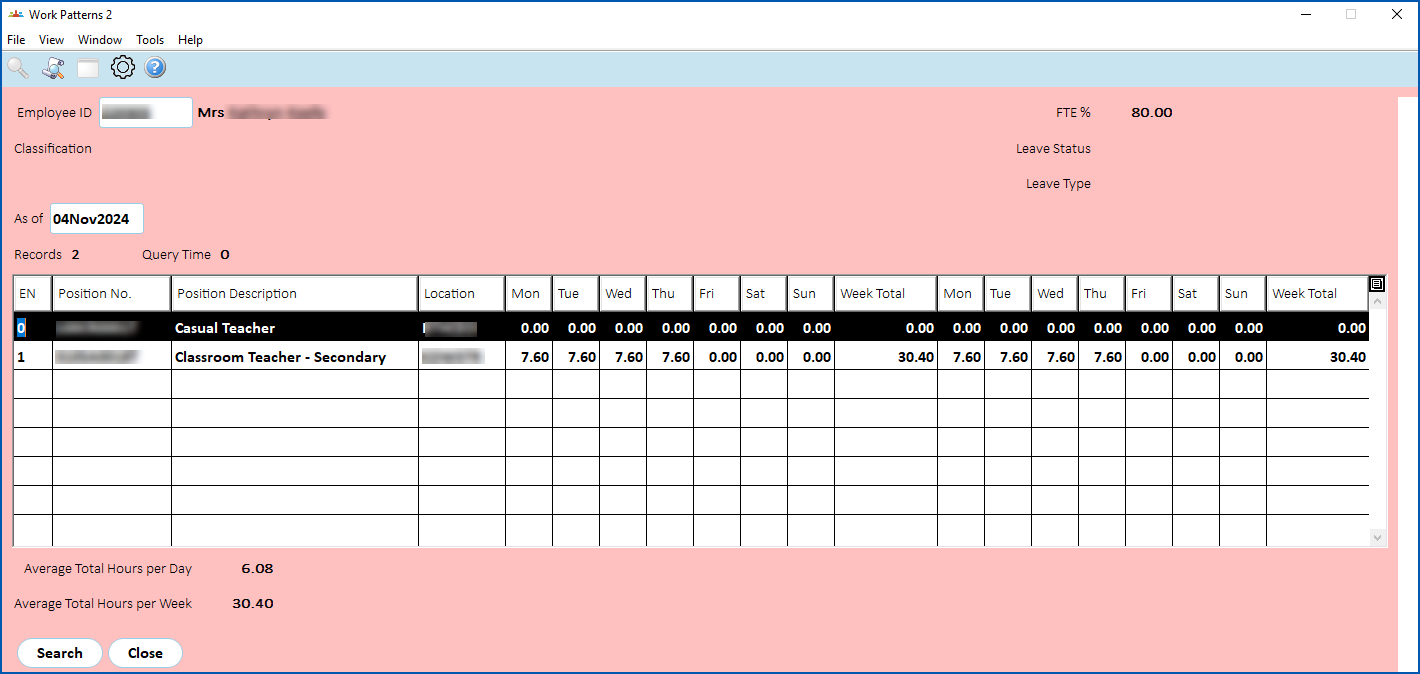
|  | The **As of** date defaults to today's date. If you want to view the work pattern for a past or future date, click **Clear Table**, enter the date you want in the **As of** field, and then click **Search** to display the results. |
| --- | --- |
1. The screen shows the:
* FTE% for each employment
* number of days according to the **Length of Work Patterns** screen
* total for each day
* subtotals for each week
* average total hours per day
* average total hours per week
| Next topic
[Workforce management](/articles/ehr-user-guide/workforce-management) |
| --- |
© 2023 Fusion5. All rights reserved.