---
title: "View transactional data (audit enquiry)"
id: "view-transactional-data-audit-enquiry"
project: "EHR User Guide"
url: "https://help.cloud5.com.au/articles/ehr-user-guide/view-transactional-data-audit-enquiry"
updated: 2026-10-19T00:54:26Z
---
# View transactional data \(audit enquiry\)
Here you can search for, and view, the following types of transactional changes:
* employee – payroll move
* employee type
* employment condition
* employee contract expiry
* employee work pattern
* position movements, including bulk salary and bulk cost centre
* regular allowance alterations
* regular transactions
* payment instruction
To view transactional data:
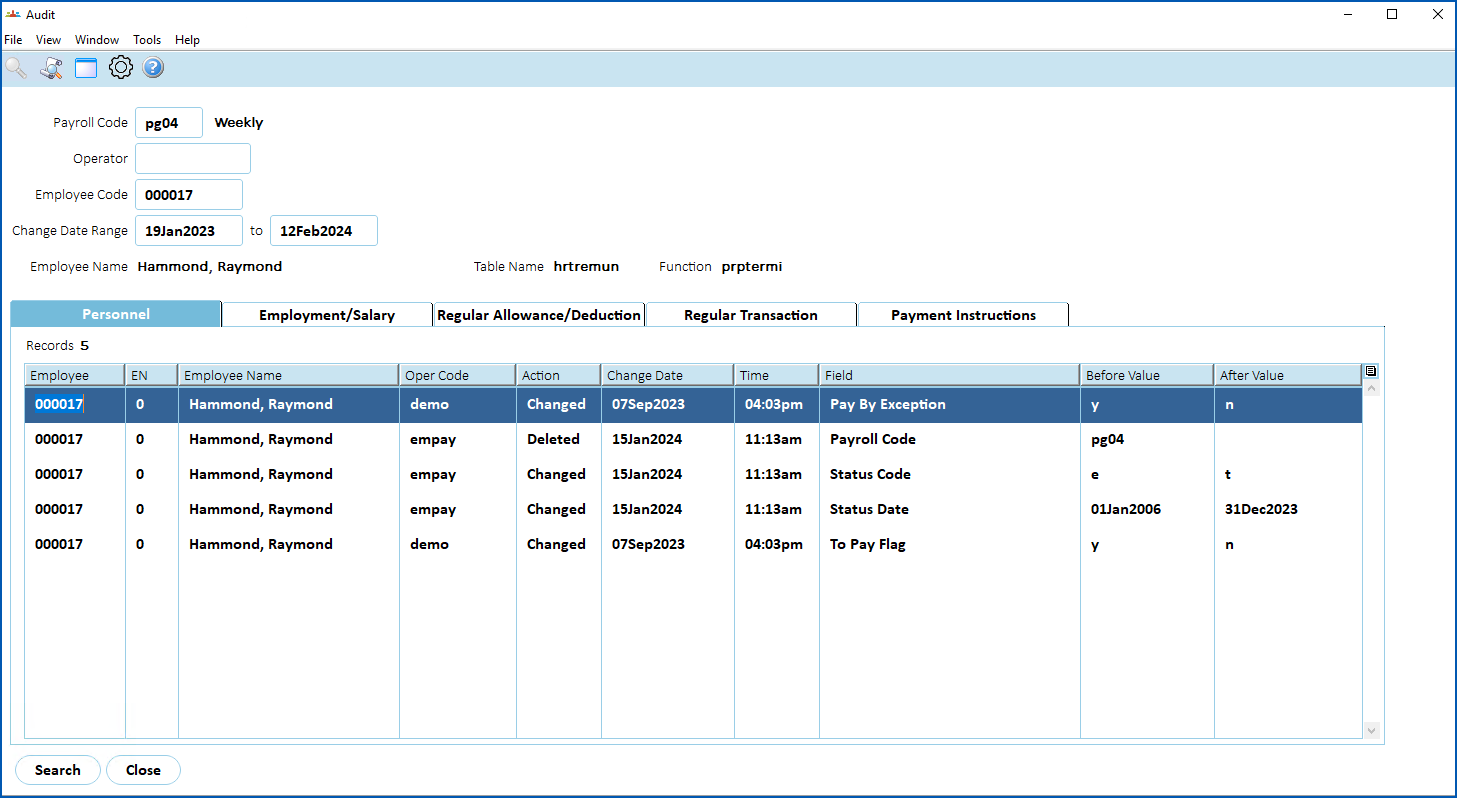
1. Go to **Enquiries**>**Administration**>**Audit**.
2. At the **Audit** ****screen, enter the:
1. **Payroll Code** (mandatory)
2. **Operator Code**
3. **Employee Code**
4. **Date Range** (mandatory)
1. Click **F** **ind Now**.
2. The results are displayed across tabs according to the type of audit. Click a tab to see the data.
| Next topic
[View pay data entry changes (audit enquiry)](/articles/ehr-user-guide/view-pay-data-entry-changes-audit-enquiry) |
| --- |
© 2023 Fusion5. All rights reserved.