Use this enquiry screen to search for positions that match personnel-related criteria. This allows you to search on a position number, or a position description, or a range of items at once.
To view position count - personnel:
- Go to Enquiries > Establishment > Position Count - Personnel.
- EmpowerHR displays the Position Count - Personnel screen.
- At Look in, select an option from the dropdown list, and then enter search criteria in For.
- Click Find Now. The results are displayed. In the following example, we searched on Class (classification). EmpowerHR displays the results that match the classification search criteria, listing each position and the establishment action.
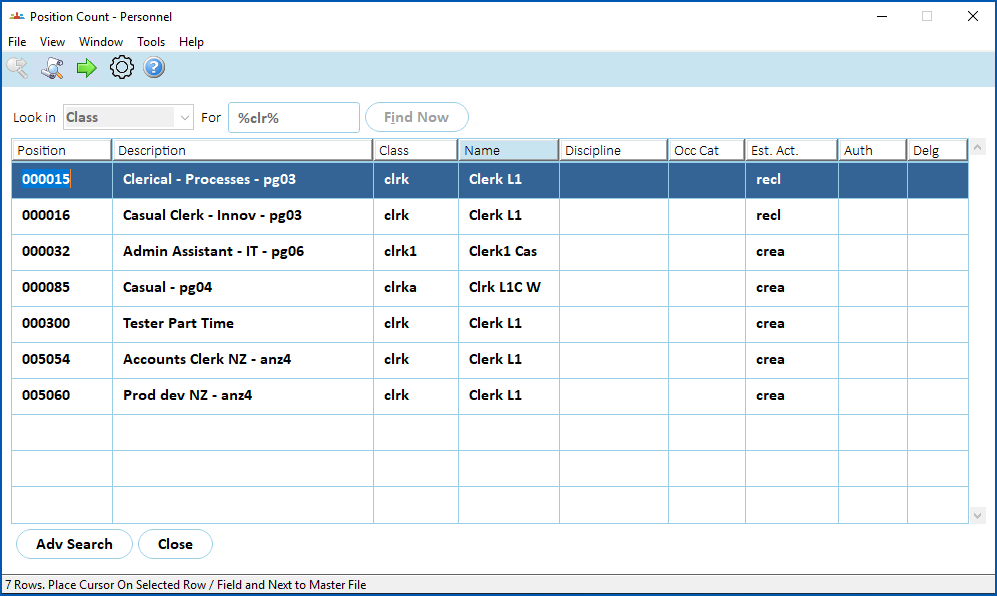
- If you want to drill down to see details of a particular position listed, select the row containing the position, and then click Next Level.
© 2023 Fusion5. All rights reserved.