---
title: "View LSL average FTE%"
id: "view-lsl-average-fte"
project: "EHR User Guide"
url: "https://help.cloud5.com.au/articles/ehr-user-guide/view-lsl-average-fte"
updated: 2026-10-19T00:53:23Z
---
# View LSL average FTE%
With this enquiry screen, you can view an employee's:
* LSL accrual
* balances
* average FTE%
* total accrual period days
For full-time LSL, EmpowerHR can display the average FTE% and total days calculation, including any associated part-time leave for the equivalent period.
This information can show average FTE% over a required number of months, for example, the last twelve months.
To view LSL average FTE%:
1. Go to **Enquiries** > **Leave** > **LSL Average FTE**.
2. The **LSL Average FTE** screen displays.
3. At **Employee Code**,****enter the employee code if you know it, or click **Window**, find and double-click the code to add it to the field.
4. Press **Tab**.
5. The **Employee Name** displays. If the employee has multiple employments, the **EN's** displays **y**, or else the field displays **n**.
6. At:
1. **Enquiry Period From**, enter the start date of the period you want to look at. Otherwise, leave this field blank to default to the current employment start date.
2. **To**, enter the end date of the period you want to look at. Otherwise, leave this field blank.
3. **Combine Full/Part Time (y/n)**, enter **y** if your organisation has full-time and part-time LSL rules. Otherwise, enter **n**.
|  | If the **Combine Full/Part Time (y/n)** flag is set to:
- y, the calculation of the running Av FTE% and the running total (accrual period), TotDays, includes the FTE% and the accrual days of the associated part-time leave type and code
- n, each leave type/code is treated as a separate entity, that is, the running totals only include the figures for the leave/type code of the row
|
| --- | --- |
1. EmpowerHR displays the results of your enquiry.
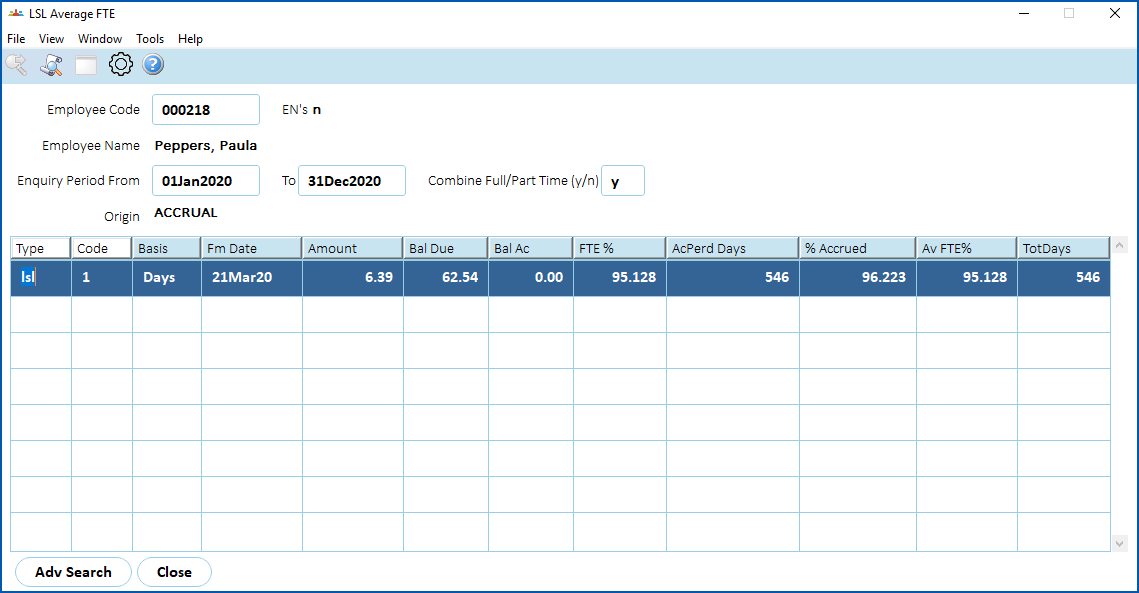
1. Here's an explanation of your enquiry results:
| **This field...** | **Shows...** |
| --- | --- |
| Origin | how the data row was created |
| Type
Code | LSL code/type |
| Fm Date | accrual date, displayed in descending order |
| Amount | number of days accrued, displayed in months or days depending on the installation option |
| Bal Date | running balance due |
| Bal Ac | running non-current balance |
| FTE% | average % full-time for LSL accrual period |
| Accr Days | number of calendar days in accrual period |
| % Accrued | sum of the percentage accrued from accrual records |
| Av FTE% | running average FTE% calculated over the enquiry period |
| TotDays | running total accrual period days calculated over the enquiry period |
| Next topic
[View LSL hours browse](/articles/ehr-user-guide/view-lsl-hours-browse) |
| --- |
© 2023 Fusion5. All rights reserved.