---
title: "View individual formula calculation information"
id: "view-individual-formula-calculation-information"
project: "EHR User Guide"
url: "https://help.cloud5.com.au/articles/ehr-user-guide/view-individual-formula-calculation-information"
updated: 2026-10-19T00:52:44Z
---
# View individual formula calculation information
EmpowerHR's Individual Formula Calculation screen shows information about the calculation of Christmas formula values.
The system captures the data during the Pay Calculation process run in the Loading/Calc pay period, and only displays the record after that pay period is finalised.
To view individual formula calculation information:
1. Go to **Enquiries** > **School** > **Individual Formula Calculation**.
2. Enter:
1. an individual **Employee code**, *or*
2. **%** in the **Employee code** field to search for all employees, *or*
3. a **Payroll** code
3. Click **Search**.
4. EmpowerHR displays:
1. only formula values for the current school year
2. only employees receiving an end of year formula payment
3. in the **Update $** column, any formula amount(s) changed via the **Update Formula Value** **s** screen
4. a warning if you searched for an individual employee for whom the Formula Type was manually updated
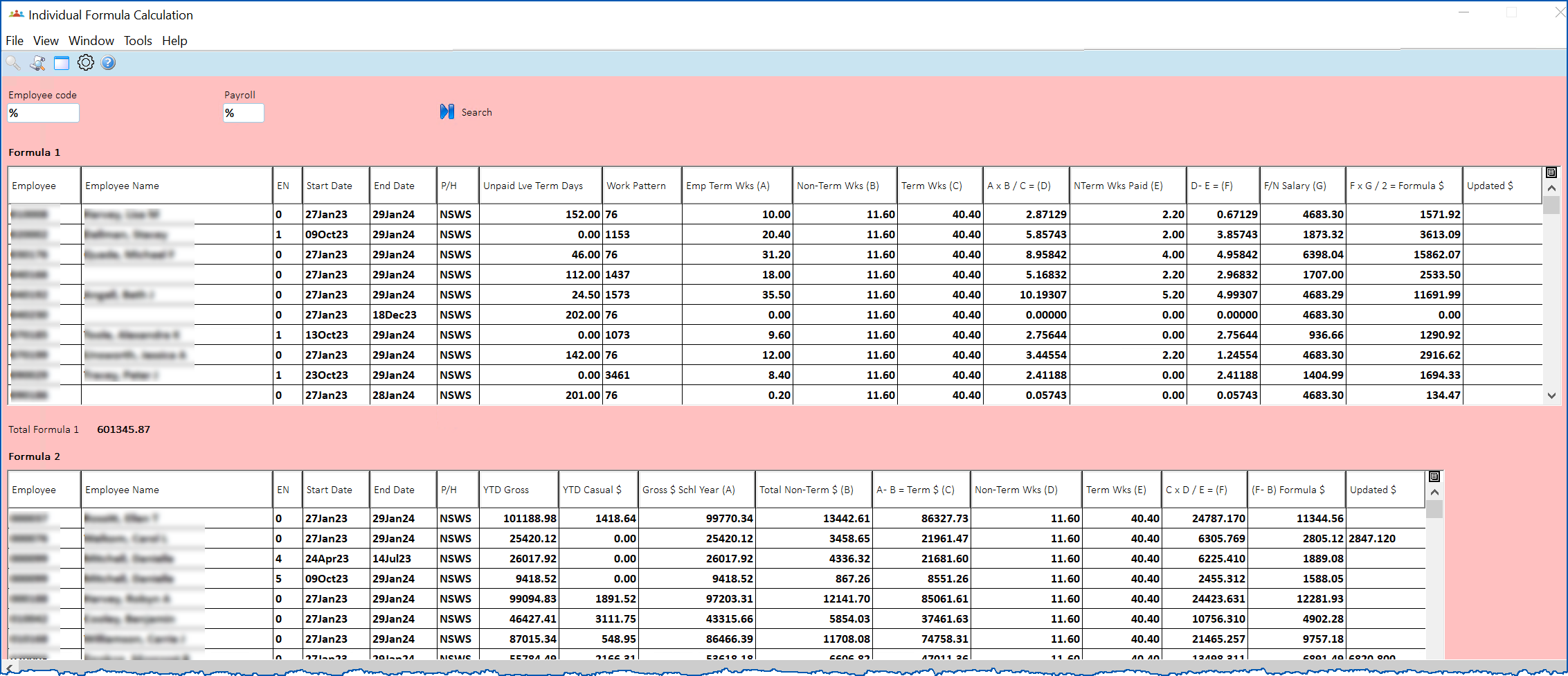
## Formula 1 details
Here are all the Formula 1 columns explained:
| **Column** | **Description** |
| --- | --- |
| Employee | Employee code |
| Employee Name | Employee name |
| EN | Employee number |
| Start Date | If commencing during the school year, this is the start date of the employment, otherwise, it is the start of the school year. |
| End Date | If ending employment during the schools year, this is the end date of the employment, otherwise, it is the last day of the school year. |
| P/H | The Public Holiday code on the position screen for the employment. |
| Unpaid Lve Term Days | The number of calendar term days from the unpaid leave bookings in the current school year. |
| Work Pattern | The Work Pattern code on the position screen for the employment. |
| Emp Term Wks (A) | The number of term weeks worked since the start of the school year (up to the end of Term 4 or the employment end date). |
| Non-Term Wks (B) | The total number of non-term weeks in the year (from the P/H code). |
| Term Wks (C) | Total number of term weeks in the year (from the P/H code) |
| A x B / C = (D) | Result = Emp Term Weeks x Non-Term Weeks / Term weeks |
| NTerm Wks Paid (E) | The number of non-term weeks worked since the start of the school year (up to the end of Term 4 or the employment end date). |
| D - E = (F) | The result in weeks. |
| F/N Salary (G) | Current fortnightly salary (including current regular allowances). |
| F x G / 2 = Formula $ | The total formula amount. |
| Updated $ | The total updated formula amount where formula records have been manually updated via the **Update Formula Values** screen. |
## Formula 2 details
Here are all the Formula 2 columns explained:
| **Column** | **Description** |
| --- | --- |
| Employee | Employee code |
| Employee Name | Employee name |
| EN | Employee number |
| Start Date | If commencing during the school year, this is the start date of the employment, otherwise, it is the start of the school year. |
| End Date | If ending employment during the schools year, this is the end date of the employment, otherwise, it is the last day of the school year. |
| P/H | The Public Holiday code on the position screen for the employment. |
| YTD Gross | The YTD Gross (including YTD Casual hours payments). |
| YTD Casual $ | Total casual hours payments since the start of the school year |
| Gross $ Schl Year (A) | The salary paid since the start of the school year, excluding any Casual hours' payments. |
| Total Non-Term $ (B) | The salary paid in respect of non-term weeks since the start of the school year. |
| A - B = Term $ (C) | The result is the salary paid in respect of Term weeks since the start of the school year. |
| Non-Term Wks (D) | The total number of non-term weeks in the school year (from the P/H code). |
| Terms Wks (E) | The total number of term weeks for the school year (from the P/H code). |
| C x D / E = (F) | The result in dollars for Term $ x Non-Term Weeks / Term Weeks |
| (F-B) Formula $ | The total formula amount. |
| Updated $ | The total updated formula amount where formula records have been manually updated via the **Update Formula Values** screen |
| Next topic
[View employee/pay code browse](/articles/ehr-user-guide/view-employee-pay-code-browse) |
| --- |
© 2023 Fusion5. All rights reserved.