---
title: "View employee/pay code browse"
id: "view-employee-pay-code-browse"
project: "EHR User Guide"
url: "https://help.cloud5.com.au/articles/ehr-user-guide/view-employee-pay-code-browse"
updated: 2026-10-19T00:53:14Z
---
# View employee/pay code browse
If you enter employee position movements after processing the final Gather and Calculate processes in the pay period flagged as **Loading/Christmas Formula** period, EmpowerHR automatically:
* recalculates the employee's PBE hours for the pay period containing the end of the school vacation period (SVP) and the start of Term 1PBE = Pay By Exception
* determines the **Ordinary Hours** for Term 1 commencement when you save the position movement
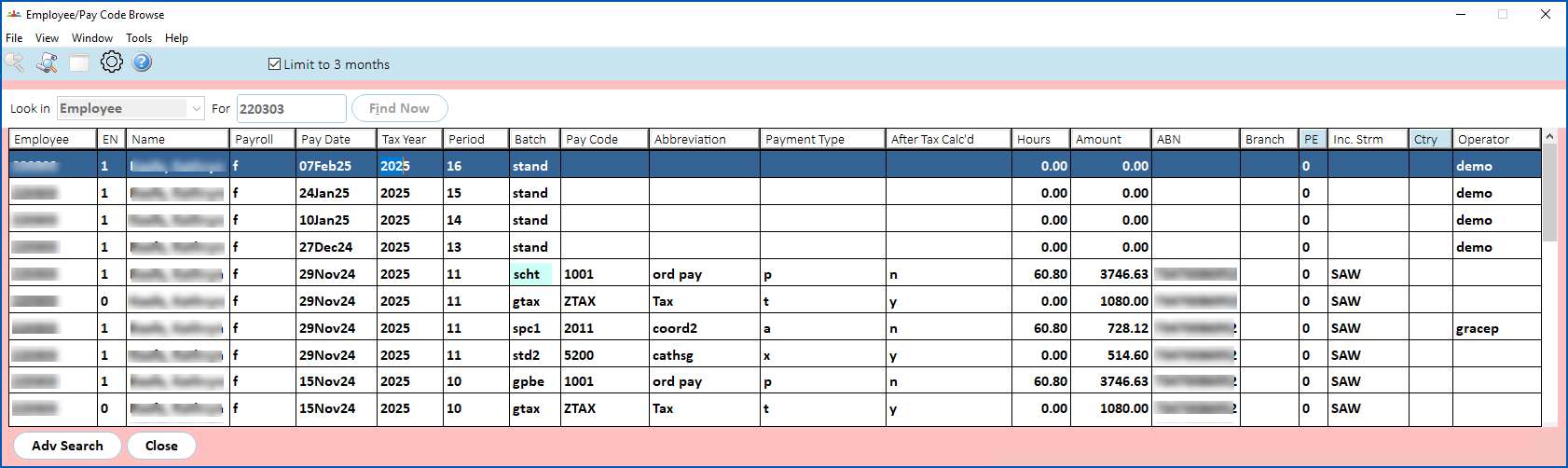
* adds records to the **schx** and **scht** batches
To see the batches, go to **Enquiries** > **Payroll** > **Employee/Pay Cod** **e Browse**. 
| Next topic
[Manage casual relief](/articles/ehr-user-guide/manage-casual-relief) |
| --- |
© 2023 Fusion5. All rights reserved.