---
title: "View booking absences"
id: "view-booking-absences"
project: "EHR User Guide"
url: "https://help.cloud5.com.au/articles/ehr-user-guide/view-booking-absences"
updated: 2026-10-19T00:53:44Z
---
# View booking absences
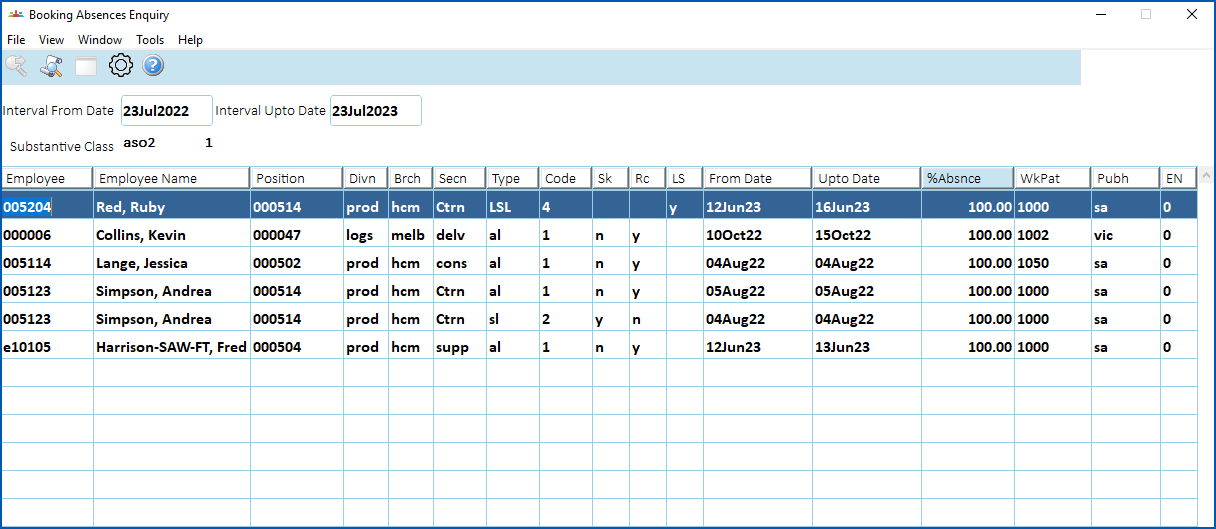
To view booking absences:
1. Go to **Enquiries**>**Leave**>**Booking Absences Enquiry.**
2. At:
1. **Interval From Date**, enter the start date of the period you want to view
2. **Interval Upto Date**, enter the end date of the period you want to view
3. Press **Tab**. The results are displayed.
| Next topic
[View employee balances](/articles/ehr-user-guide/view-employee-balances) |
| --- |
© 2023 Fusion5. All rights reserved.