---
title: "Use organisation chart in desktop"
id: "use-organisation-chart-in-desktop"
project: "EHR User Guide"
url: "https://help.cloud5.com.au/articles/ehr-user-guide/use-organisation-chart-in-desktop"
updated: 2026-10-19T00:53:09Z
---
# Use organisation chart in desktop
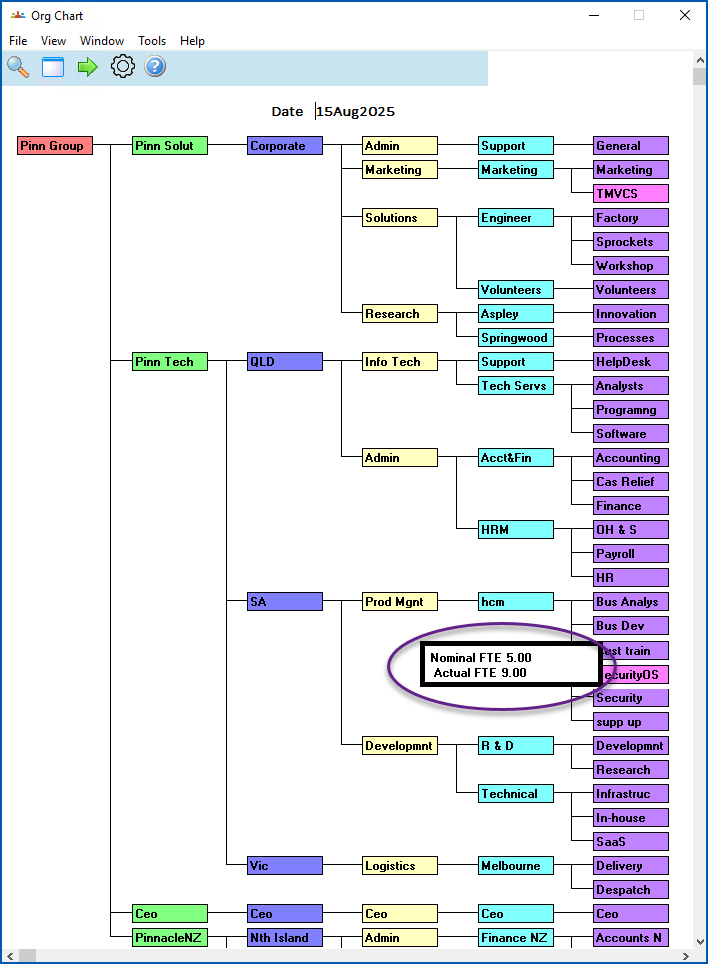
The desktop Org Chart is a visual display of the organisation structure.
The Chart provides a view of the structure as at a defined date, based on EmpowerHR records of structure changes and history.
To view the desktop Org Chart:
1. Go to **Tasks** > **Organisation** > **Org Chart**.
2. EmpowerHR displays the chart as at the current date.
3. You can:
1. right-click a section to display the section's Nominal FTE figures (from the section code) and Actual FTE figures (from the employee). Right-click the section again to clear the display.
2. view projected future movements or see how your structure looked in the past, by simply entering the **Date** you want and pressing **Enter**.
| Next topic
[Use organisation chart in self service](/articles/ehr-user-guide/use-organisation-chart-in-self-service) |
| --- |
© 2023 Fusion5. All rights reserved.