---
title: "Update installation settings for flexi leave"
id: "update-installation-settings-for-flexi-leave"
project: "EHR User Guide"
url: "https://help.cloud5.com.au/articles/ehr-user-guide/update-installation-settings-for-flexi-leave"
updated: 2026-10-19T00:54:14Z
---
# Update installation settings for flexi leave
## Update flexi leave installation settings to link them to leave elements
Update the installation settings to link them to the new [leave elements](/articles/ehr-user-guide/create-leave-elements-for-flexi-leave) for:
* flexi credit leave
* flexi banked leave
To update the installation settings:
1. Go to **Administration** > **Agency Management** > **Installation Settings**.
2. At the **Installation Settings** summary screen, filter the list. For example, select:
1. **Empower Desktop** from the **Category** dropdown list
2. **Leave** from the **Groups** dropdown list
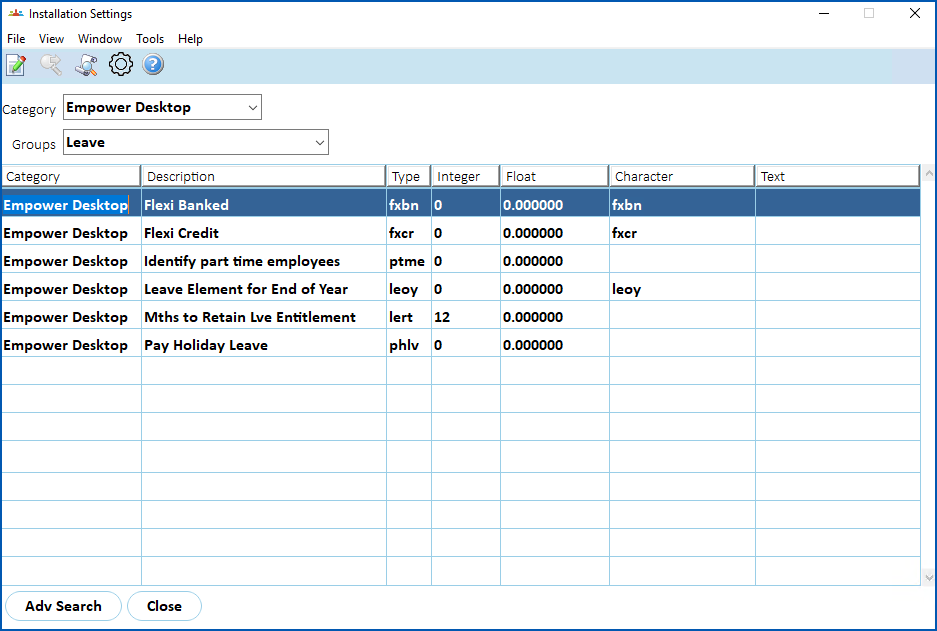
1. Select a flexi installation setting, and then click **Open**
2. At the **Installation Settings** detail screen, make sure the **Character Variable** is correct. It must be the same as the corresponding [leave element code](/articles/ehr-user-guide/create-leave-elements-for-flexi-leave) created for flexi leave.
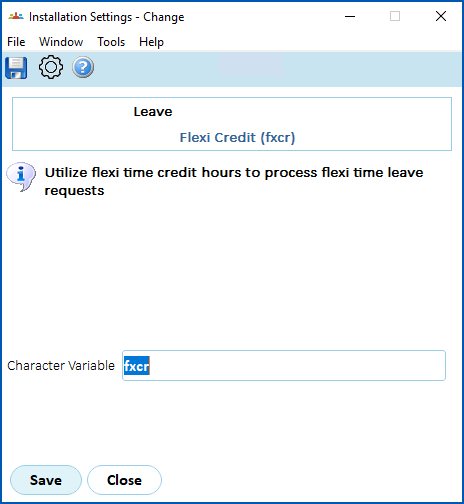
1. Click **Save**.
##
| Next topic
[Update installation settings for flexi timesheets](/articles/ehr-user-guide/update-installation-setting-for-flexi-timesheets) |
| --- |
© 2023 Fusion5. All rights reserved.