---
title: "Time & claim request configuration"
id: "time-claim-request-configuration"
project: "EHR User Guide"
url: "https://help.cloud5.com.au/articles/ehr-user-guide/time-claim-request-configuration"
updated: 2026-10-19T00:52:41Z
---
# Time & claim request configuration
Time and claims requests can only be made on payment codes contained with the pay element defined in the **(jpem) Pay element for claims entry** installation setting.
To set up the time and claims request (pay element):
1. Go to **Administration**> **Configuration**> **All Configuration**.
2. At **Configuration Items**, expand **Self Service**, and then****expand **Time and Claims**.
3. Click **(jpem) Pay element for Claims entry**.****
4. Enter the pay element code in the **Text**field.
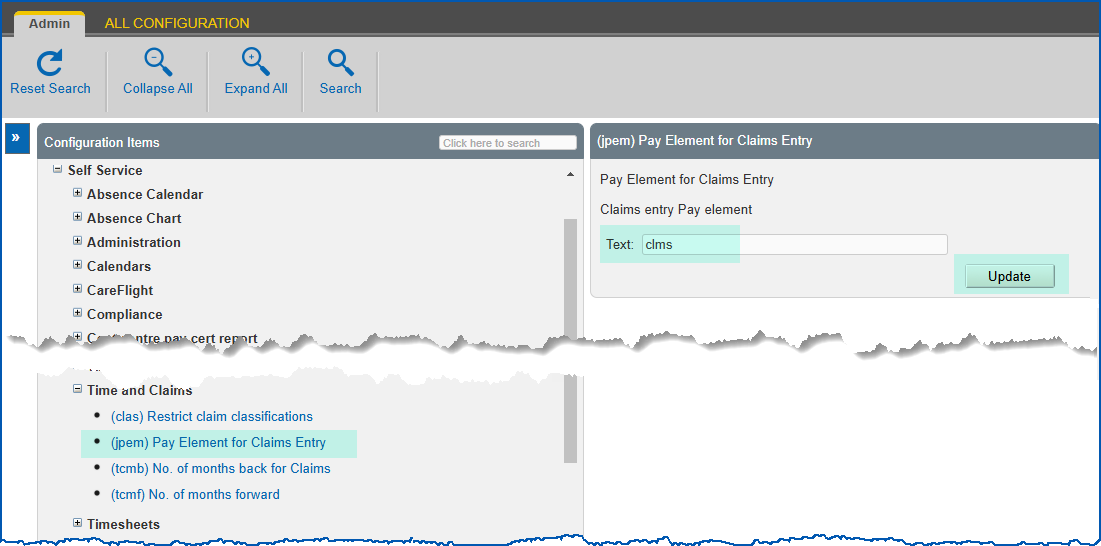
1. Click **Update**.
| Next topic
[Web services](/articles/ehr-user-guide/web-services) |
| --- |
© 2023 Fusion5. All rights reserved.