---
title: "Tax scale codes"
id: "tax-scale-codes"
project: "EHR User Guide"
url: "https://help.cloud5.com.au/articles/ehr-user-guide/tax-scale-codes"
updated: 2026-10-19T00:53:32Z
---
# Tax scale codes
If you've created your own custom tax scales, here's how to update them with the correct tax treatment codes.
|  | The [ATO](https://www.ato.gov.au/)website has the list of tax treatment codes and their definitions. |
| --- | --- |
To update a custom tax scale to add a tax treatment code:
1. Go to **Control Tables** > **Taxation** > **Tax Scales**.
2. At the **Tax Scales** summary screen, click **Find Now** to list all tax scale codes.
3. Find and select a custom tax code, and then click **Open**.
4. At the **Tax Scales** details screen, go to the **Tax Treatment** field and enter the six-character tax treatment code.
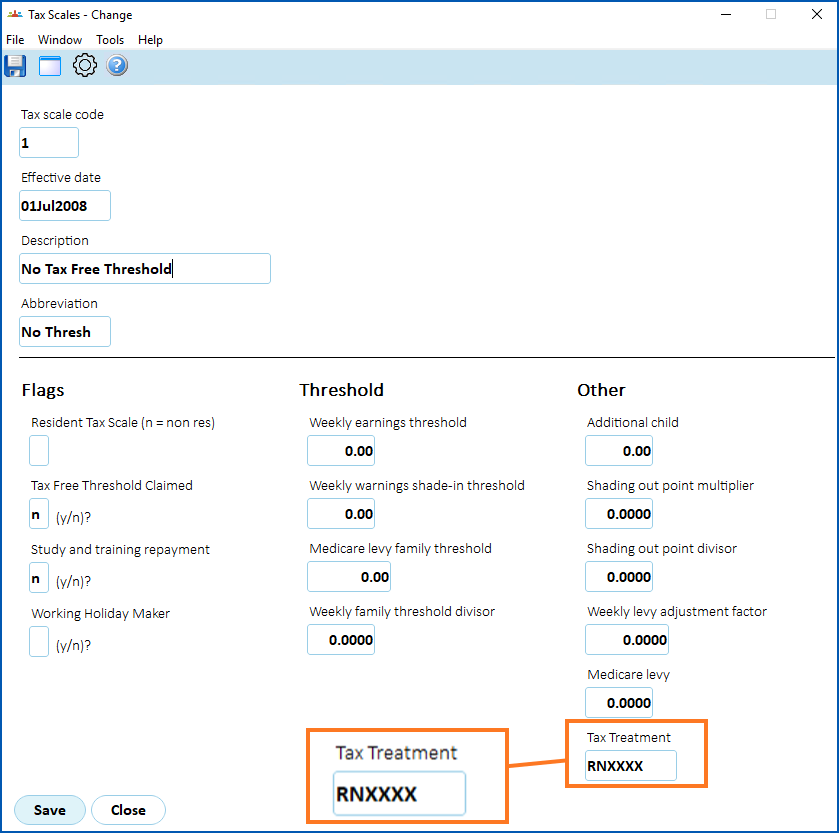
1. Click **Save**.
| Next topic
[Term dates](/articles/ehr-user-guide/term-dates) |
| --- |
© 2023 Fusion5. All rights reserved.