---
title: "Skill codes"
id: "skill-codes"
project: "EHR User Guide"
url: "https://help.cloud5.com.au/articles/ehr-user-guide/skill-codes"
updated: 2026-10-19T00:54:23Z
---
# Skill codes
Skill codes are used to identify the requirements of a casual vacancy.
If you organise skill codes into high level groups (via skill group codes), EmpowerHR uses these groups to display skills in an expandable list in ESS.
## Create a skill code
To create a skill code:
1. Go to **Control Tables** > **Skills** > **Skills** > **Skills Codes**.
2. The **Skills Codes** summary screen displays.
3. Click **New**.
4. At the **Shift Codes (add)** detail screen, make your selections and entries using the following table as a guide.
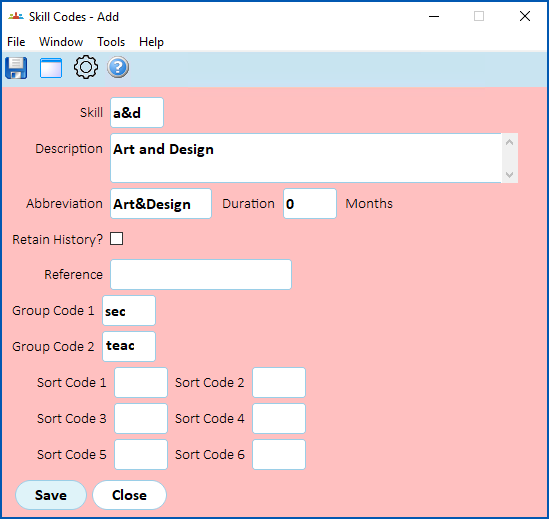
| **At this field...** | **Do this...** |
| --- | --- |
| Skill | Enter a skill code (up to 4 characters) |
| Description | Enter a description of the skill code (up to 90 characters) |
| Abbreviation | Enter an abbreviation for the skill code (up to 10 characters) |
| Duration | Nothing. Duration is not required for a skill code. |
| Retail History? | Click this checkbox to allow managers to view history of the codes in self service. |
| Reference | Enter a Australian National Training Authority (ANTA) competency code (up to 20 characters) |
| Group Code 1 | To organise the skill code into a high level group:
- enter a valid group code 1 code if you know it, or
- click Window, find and double-click the code to add it to the field.
|
| Group Code 2 | To organise the skill code into a high level group:
- enter a valid group code 2 code if you know it, or
- click Window, find and double-click the code to add it to the field.
|
| Sort Code 1 *to*
Sort Code 6 | Nothing. Not used. |
1. Click **Save**.
2. Repeat this procedure, starting at step 3, until you have created all the skill codes you need.
| Next topic
[Sort code 1](/articles/ehr-user-guide/sort-code-1) |
| --- |
© 2023 Fusion5. All rights reserved.