---
title: "Set up termination reason codes (GESB)"
id: "set-up-termination-reason-codes-gesb"
project: "EHR User Guide"
url: "https://help.cloud5.com.au/articles/ehr-user-guide/set-up-termination-reason-codes-gesb"
updated: 2026-10-19T00:53:10Z
---
# Set up termination reason codes \(GESB\)
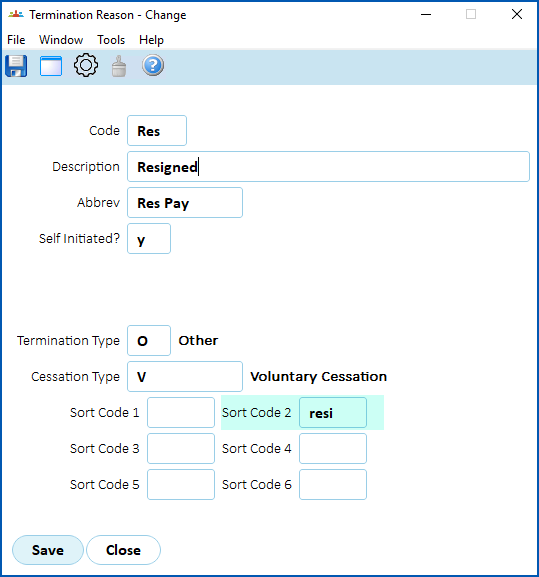
The GESB super output file requires specific text for termination reasons. For this purpose, EmpowerHR uses the Sort Code 2 field on the termination reason code.
To set up the termination reason codes:
1. Go to **Control Tables** > **Termination** > **Termination Reason**.
2. The **Termination Reason** summary screen displays.
3. For each of the following list of termination reasons:
1. Select the code, and then click **Open**.
2. At the **Termination Reason** detail screen, enter the relevant code in the **Sort Code 2** field, and then click **Save**.
| **Text** | **Sort Code 2** |
| --- | --- |
| Resigned | resi |
| Retirement | ret |
| Death | dth |
| Disablement | dis |
| LWOP | lwop |
| Parental | par |
| Transfer | tfer |
| Other | oth |
| Next topic
[Set up employment condition codes (GESB)](/articles/ehr-user-guide/set-up-employment-condition-codes-gesb) |
| --- |
© 2023 Fusion5. All rights reserved.