---
title: "Set up self service form templates"
id: "set-up-self-service-form-templates"
project: "EHR User Guide"
url: "https://help.cloud5.com.au/articles/ehr-user-guide/set-up-self-service-form-templates"
updated: 2026-10-19T00:53:45Z
---
# Set up self service form templates
Here we show you how to set up a form template in EmpowerHR. Form templates can be:
* employee-specific
* position-specific
* generic
Based on a form template:
* employees can create and maintain a form, while managers (who have the relevant organisational security access) can view and update the form
* managers can create employee-specific forms on behalf of their employees
* managers can create generic forms for themselves
EmpowerHR allows versioning. This means you can modify a template's form field definitions and, on saving, EmpowerHR generates a new version of the template. When a user creates a form, it's based on the template version at the time of creation.
You can attach a form template to a workflow. Alternatively, any form not attached to a workflow can:
* include a message for emailing between employee and manager
* be flagged as Finalise (or ongoing)
|  | If you set up a form template as Finalise (or ongoing), forms based on the template cannot be changed once the user finalises the form. |
| --- | --- |
To set up a form template: 
1. Go to **Administration** > **Screen Management** > **Self Service Forms**.
2. At the **Self Service Forms** summary screen, click **Find Now** to display a list of existing forms.
3. Click **New**.
4. At the **Self Service Forms** detail screen, complete the [self service form fields](/articles/ehr-user-guide/self-service-form-fields).
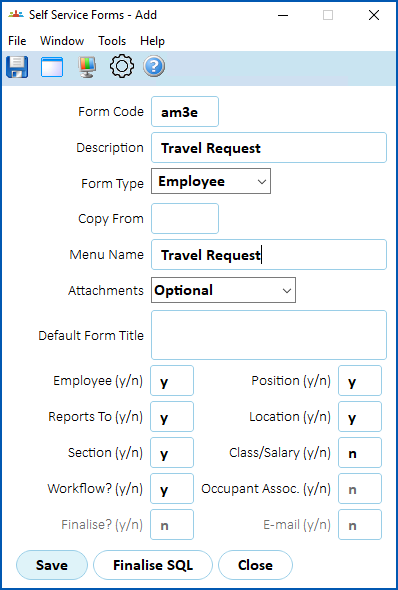
1. Click **Save**.
2. EmpowerHR displays the **Self Service Forms** summary screen.
3. Click **Next Level**. The **Form Fields Definition** screen displays. See [define form fields](/articles/ehr-user-guide/define-form-fields) for what to do next.
| Next topic
[Self service form fields](/articles/ehr-user-guide/self-service-form-fields) |
| --- |
© 2023 Fusion5. All rights reserved.