EmpowerHR uses thresholds when calculating flexi time. Thresholds are held against work patterns. You can set different thresholds for different work patterns to suit your organisation.
Set the following flexi time thresholds:
- minimum flexi hours per settlement period
- maximum flexi hours carried forward to the next settlement period
- maximum flexi banked hours

|
EmpowerHR automatically pro-rates part-time work patterns. |
To set flexi time thresholds:
- Go to Control Tables > Calendars > Work Pattern Codes.
- At the Work Pattern Codes summary screen, find the work pattern code you want to set thresholds on, and then click Open.
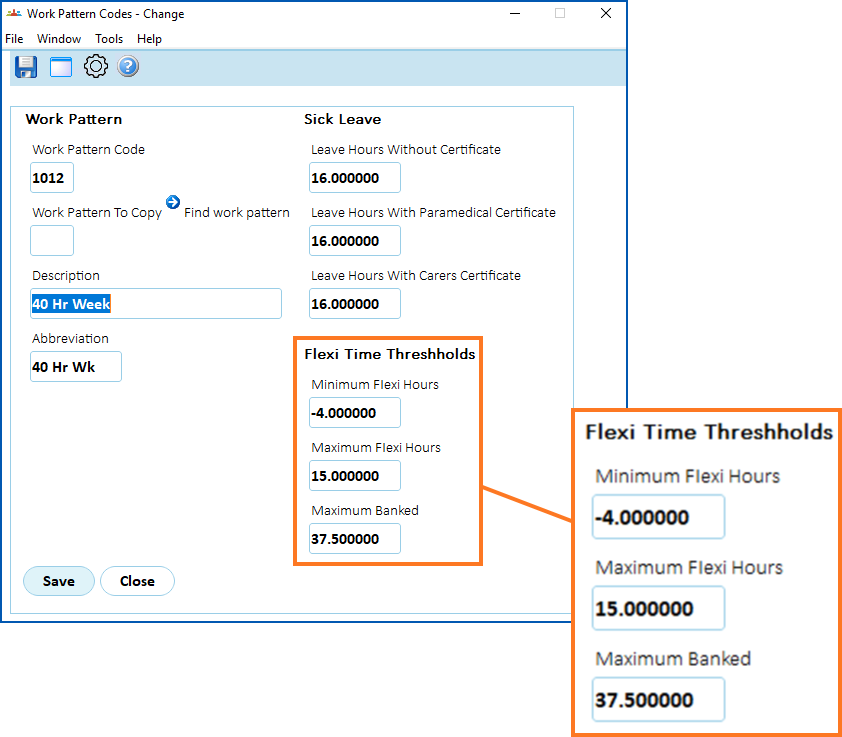
- At the Work Pattern Codes detail screen, complete the Flexi Time Thresholds fields using the following example and table as a guide.
|
At this field...
|
Do this... |
|---|---|
|
Minimum Flexi Hours
|
Enter the maximum number of negative flexi hours an employee can submit on a timesheet, for example, -4 |
|
Maximum Flexi Hours
|
Enter the maximum number of flexi hours an employee can accrue before the hours are banked, for example, 15 |
| Maximum Banked | Enter the maximum number of banked flexi hours an employee can accrue in a year, for example, 37.5. This is also the maximum number of banked flexi hours an employee can have. |
- Click Save.
- Repeat this procedure, starting at step 2, until you've set the flexi time thresholds for all the work pattern codes you need.
© 2023 Fusion5. All rights reserved.