---
title: "Self service employee access"
id: "self-service-employee-access"
project: "EHR User Guide"
url: "https://help.cloud5.com.au/articles/ehr-user-guide/self-service-employee-access"
updated: 2026-10-19T00:52:42Z
---
# Self service employee access
## Grant/revoke an employee's access to self service
From EmpowerHR's Employee Access catalogue, you can:
* grant or remove an employee's access to self service
* assign an alternate template to an employee, replacing your organisation's default ESS template (if required)
###
When you grant or reset an employee's access, EmpowerHR creates a temporary link and sends it to the employee's email address.
###
## Grant/revoke access
To grant or remove an employee's access to self service (or assign an alternate template to the employee):
1. Go to **Administration** > **Security** > **Employee Access**.
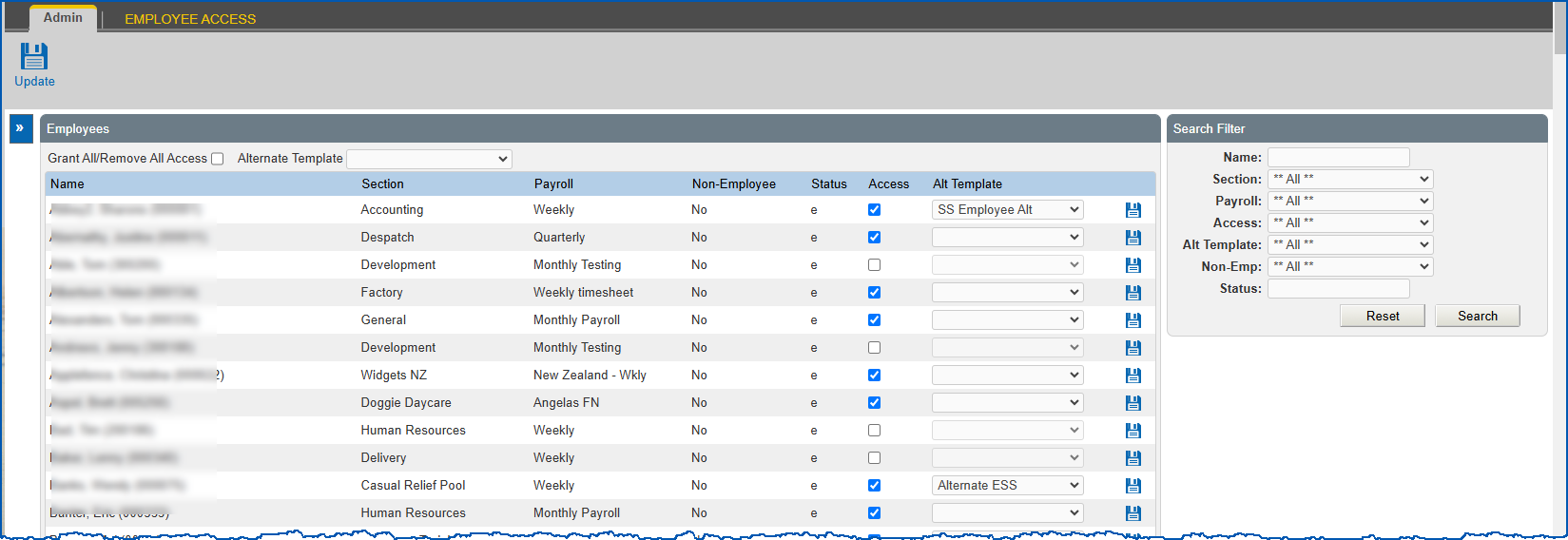
2. The **Employee Access** ****catalogue displays.
3. At **Search Filter**, complete the fields according to the type of search criteria you want to apply, and then click **Search** to see the results.
4. EmpowerHR displays the results of your search. For each employee listed, the system shows their self service access and, if chosen, an alternate template.
5. At the row containing the employee you want to update, to:
1. grant access, select the **Access** checkbox
2. remove access, clear the **Access** checkbox
3. assign an alternate template, make sure the **Access** checkbox is selected, and then select a template from the **Alt Template** dropdown list
|  | If you want to:
- grant/remove access for all employees in your search results, select/clear the Grant/Remove All Access checkbox.
- assign an alternate template, select a template from the Alternate Template dropdown list
|
| --- | --- |
1. Click **Update**.
| Next topic
[Self service sign-on](/articles/ehr-user-guide/self-service-sign-on) |
| --- |
© 2023 Fusion5. All rights reserved.