---
title: "Saving a draft and returning later (FWA)"
id: "saving-a-draft-and-returning-later-fwa"
project: "EHR User Guide"
url: "https://help.cloud5.com.au/articles/ehr-user-guide/saving-a-draft-and-returning-later-fwa"
updated: 2026-10-19T00:53:36Z
---
# Saving a draft and returning later \(FWA\)
You don't have to complete your request in one sitting. At any point before submitting, you can save what you've entered and come back to it later.
## How to save a draft
You can save your draft from the icon at the top of the form or from the Save Draft button at the bottom of the screen. Either one does the same thing – your request is saved in draft status and stays with you until you're ready to finish it.
## Returning to a draft
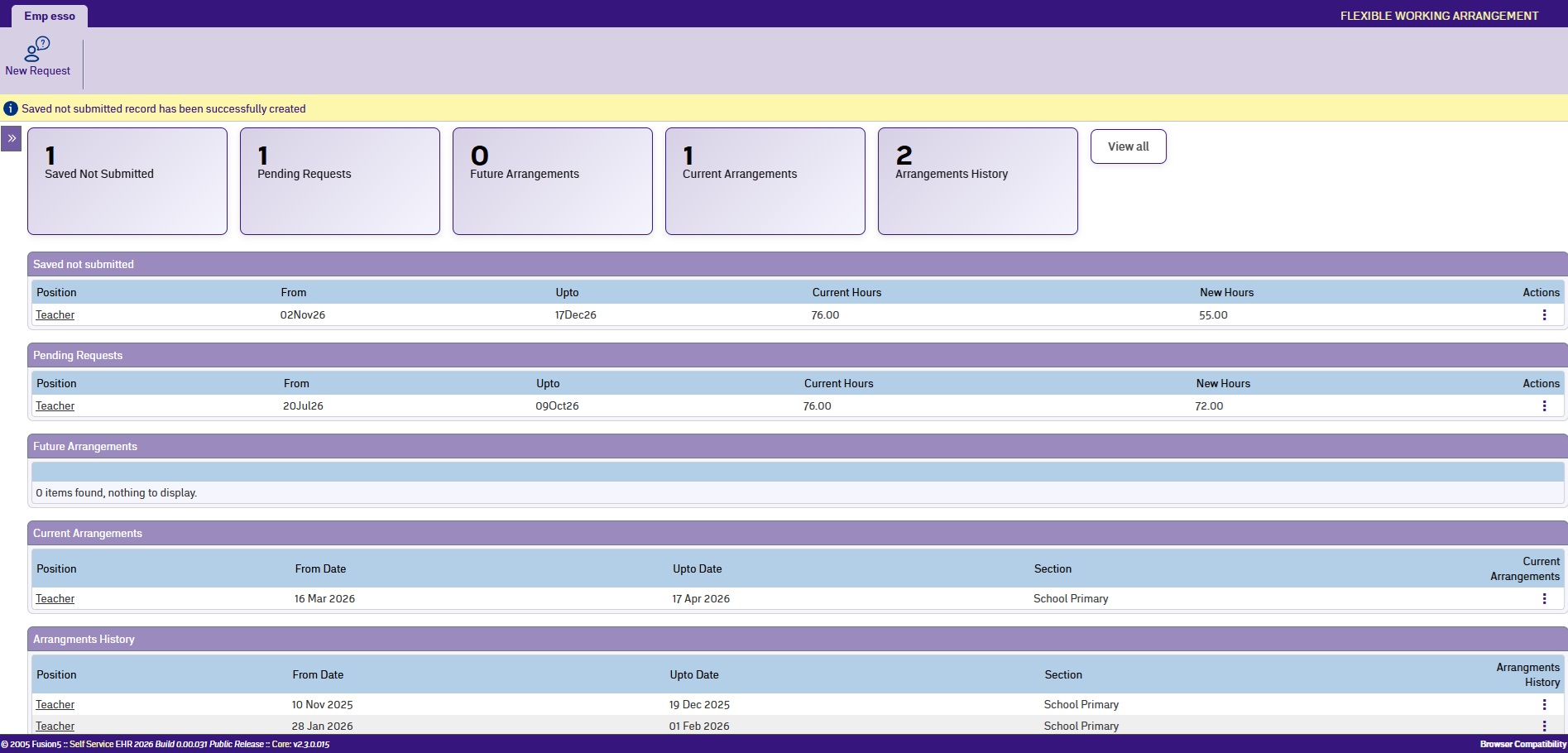
To pick up a saved draft, go to **Requests > Flexible Working Arrangements** to open your dashboard. Your draft appears under the Saved not Submitted section. Select it to open the form and continue where you left off. You can edit any part of the form before submitting.
## If you leave without saving
If you navigate away from the form without saving or submitting, any unsaved changes will be lost.
| Next topic
[After you submit (FWA)](/articles/ehr-user-guide/after-you-submit-fwa) |
| --- |
© 2023 Fusion5. All rights reserved.