---
title: "Run an STP payroll event"
id: "run-an-stp-payroll-event"
project: "EHR User Guide"
url: "https://help.cloud5.com.au/articles/ehr-user-guide/run-an-stp-payroll-event"
updated: 2026-10-19T00:52:59Z
---

# Run an STP payroll event

To run an STP payroll event: ![](/resources/Storage/ehr-user-guide/ehr-user-guide/icons/desktop%20icon.png)


1. Go to Background Jobs &gt; STP &gt; STP Files Generation &gt; STP Payroll Event – Phase 2.
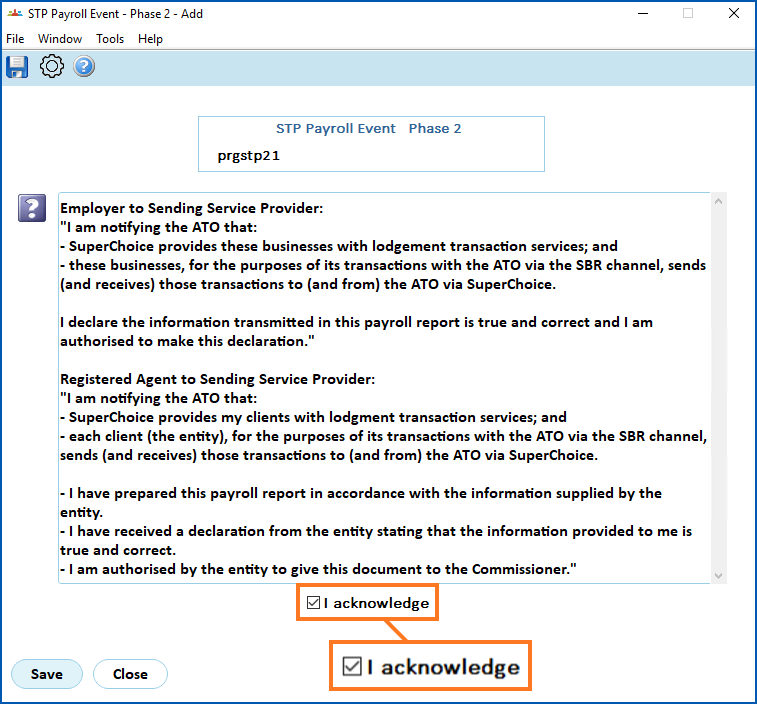
2. At STP Payroll Event – Phase 2 (declaration), select I acknowledge, and then click **Save**.

![](/resources/Storage/ehr-user-guide/run-stp-payroll-event/STP%20payroll%20event1.png)

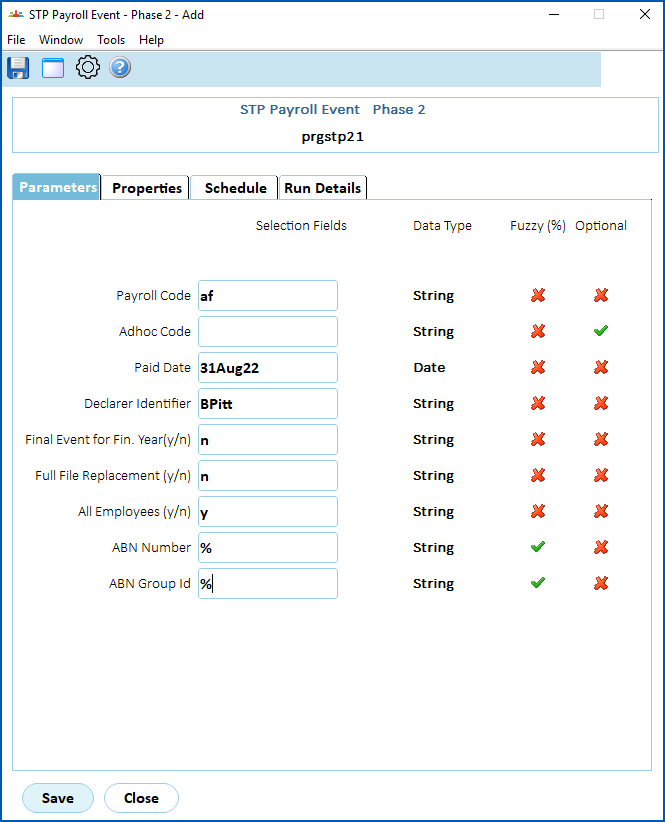
1. At the STP Payroll Event – Phase 2 detail screen, on the Parameters tab, complete the fields using the following table as a guide.

![](/resources/Storage/ehr-user-guide/run-stp-payroll-event/STP%20payroll%20event2.png)

| **At this field...** | **Do this...** |
| --- | --- |
| Payroll Code | Enter the payroll code if you know it, or click **Window**, find and double-click the code to add it to the field. |
| Adhoc Code | If you want to apply the payroll event to just those employees paid in a particular ad hoc pay run, enter the code.<br><br><br><br><br><br>Otherwise, leave this field blank. |
| Paid Date | EmpowerHR displays the paid date based on the Payroll Code/Adhoc Code you selected. |
| Declarer Identifier | Enter the name of the person completing the payroll event. The name is included in reporting to the ATO. |
| Final Event for Fin. Year Y/N | Enter:<br><ul><li><span style="font-size: 10pt;"><span style="font-family: Arial, &quot;Helvetica Neue&quot;, Helvetica, sans-serif;"><b>y</b> (yes) if generating a final file for <span id="hotspot_chpu1698298534906" class=" CHHotspot CHPopupHotspot">EOFY </span><img src="/resources/Storage/ehr-user-guide/icons/leave%20-%20info%20icon.png" alt="" style="height: auto; width: 100%; max-width: 15px;" data-ch-thumbnail-mode="none" loading="lazy">, and you&#39;ve reconciled the payroll, <i>or</i></span></span><div id="chpu1698298534906" class="CHPopup"><p><span style="font-size: 10pt;">EOFY = End of Financial Year</span></p></div></li><li><span style="font-size: 10pt;"><span style="font-family: Arial, &quot;Helvetica Neue&quot;, Helvetica, sans-serif;"><b>n</b>&#160;(no) if&#160;<i>not&#160;</i>generating a file for EOFY</span></span></li></ul> |
| Full File Replacement Y/N | Enter:<br><ul><li><span style="font-size: 10pt;"><span style="font-family: Arial, &quot;Helvetica Neue&quot;, Helvetica, sans-serif;"><b>y</b>&#160;(yes) if generating a file to replace one you&#39;ve lodged with the ATO before, <i>or</i></span></span></li><li><span style="font-size: 10pt;"><span style="font-family: Arial, &quot;Helvetica Neue&quot;, Helvetica, sans-serif;"><b>n</b>&#160;(no) if&#160;<i>not&#160;</i>generating a file as a replacement for lodging with the ATO</span></span></li></ul> |
| All Employees Y/N | Enter:<br><ul><li><span style="font-size: 10pt;"><span style="font-family: Arial, &quot;Helvetica Neue&quot;, Helvetica, sans-serif;"><b>y</b>&#160;(yes)* if including all employees,&#160;<i>or</i></span></span></li><li><span style="font-size: 10pt;"><span style="font-family: Arial, &quot;Helvetica Neue&quot;, Helvetica, sans-serif;"><b>n</b>&#160;(no) io only include employees paid in the period</span></span></li></ul><br><br>| ![Information](/resources/Storage/ehr-user-guide/ehr-user-guide/Info.png) | \*Entering **y** (yes) to include all employees generates a larger file which may incur greater charges from your SSP ![](/resources/Storage/ehr-user-guide/icons/leave%20-%20info%20icon.png)SSP = Sending Service Provider |<br>| --- | --- | |

| ABN Number | Enter:<br><ul><li><span style="font-size: 10pt;"><span style="font-family: Arial, &quot;Helvetica Neue&quot;, Helvetica, sans-serif;"><b>% </b>(wildcard character)&#160;to include all <span id="hotspot_chpu1698299375688" class=" CHHotspot CHPopupHotspot">ABNs</span> <img src="/resources/Storage/ehr-user-guide/icons/leave%20-%20info%20icon.png" alt="" data-ch-thumbnail-mode="none" style="height: auto; width: 100%; max-width: 15px;" loading="lazy">,&#160;<i>or</i></span></span><div id="chpu1698299375688" class="CHPopup"><p><span style="font-size: 10pt;">ABN = Australian Business Number,&#160;<span style="color: rgb(49, 49, 49); font-family: -apple-system, BlinkMacSystemFont, &quot;Segoe UI&quot;, Helvetica, Arial, sans-serif, &quot;Apple Color Emoji&quot;, &quot;Segoe UI Emoji&quot;, &quot;Segoe UI Symbol&quot;; text-decoration-color: initial;">a unique 11-digit number that identifies a business or organisation to the government and community</span>&#160;</span></p></div></li><li><span style="font-size: 10pt;"><span style="font-family: Arial, &quot;Helvetica Neue&quot;, Helvetica, sans-serif;">an individual ABN number<b>&#160;</b>to generate a file just for that ABN</span></span></li></ul> |
| ABN Group ID | Enter:<br><ul><li><span style="font-size: 10pt;"><span style="font-family: Arial, &quot;Helvetica Neue&quot;, Helvetica, sans-serif;"><b>%</b>&#160;(wildcard character) to include all ABN groups,&#160;<i>or</i></span></span></li><li><span style="font-size: 10pt;"><span style="font-family: Arial, &quot;Helvetica Neue&quot;, Helvetica, sans-serif;">an ABN Group ID number&#160;to generate a file just for that ABN group</span></span></li></ul> |

1. Click **Save** to run the report.

| Next topic<br> <br>[Run an STP update event](/articles/ehr-user-guide/run-an-stp-update-event) |
| --- |

© 2023 Fusion5. All rights reserved.
