---
title: "Run a drill-down query"
id: "run-a-drill-down-query"
project: "EHR User Guide"
url: "https://help.cloud5.com.au/articles/ehr-user-guide/run-a-drill-down-query"
updated: 2026-10-19T00:54:08Z
---
# Run a drill\-down query
Drill-down queries allow you to link multiple queries to drill down from summary data to more detailed or transactional data.
You can also use drill-down queries in drill-down operations.
| **Case studies: uses for drill-down queries**
Example 1
David has created a higher level query, which displays the total value of each payroll by period.
He wants to drill down on a payroll to reveal the payroll value by organisational unit.
He wants to drill down further to reveal payments by employee.
Example 2
An enquiry on employees allows David to drill down to Position, Leave, Training, Skills information, etc. |
| --- |
## Create and run a drill-down query
To create and run a drill-down query:
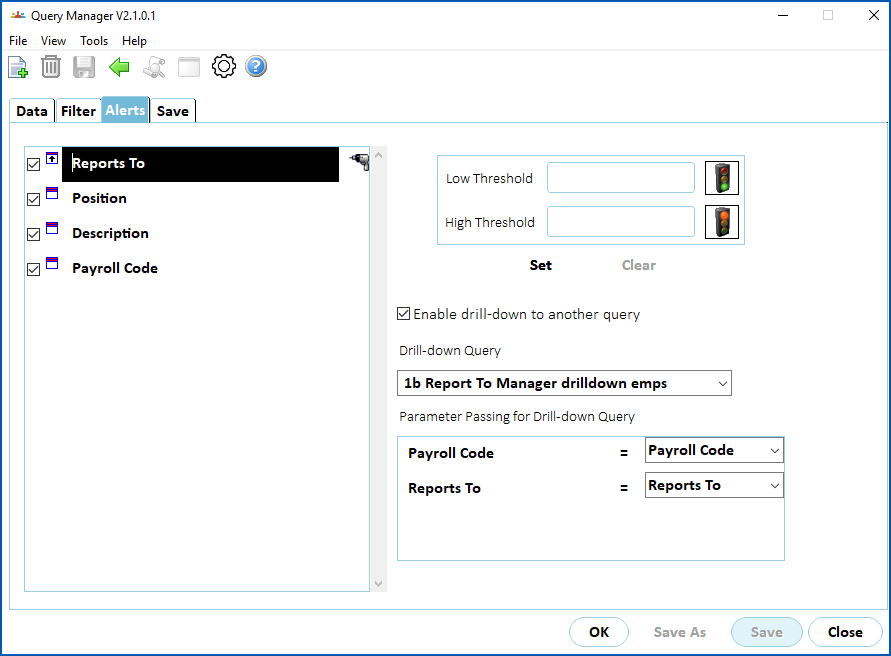
1. At the **Data** tab, select the main query, and click **Move Right** to****displays the fields in the **Query data**panel. As an example, we are using a saved query we called **1a Report To Managers by payroll code**.
2. Click **Alerts**.
3. EmpowerHR displays the **Alerts** tab, listing the fields selected in the query.
4. In the list of fields, click the field you want to launch the drill-down from, and then select **Enable drill-down to another query**. EmpowerHR displays a drill icon next to the selected field.
5. Select a **Drill-down Query**from the dropdown list.
|  | Query Manager defaults to fields with matching parameter names in the sub-query. |
| --- | --- |
1. Define the relationship between the current query's fields and the sub-query's parameters.
1. Run the main query and EmpowerHR displays the output in the query results window.
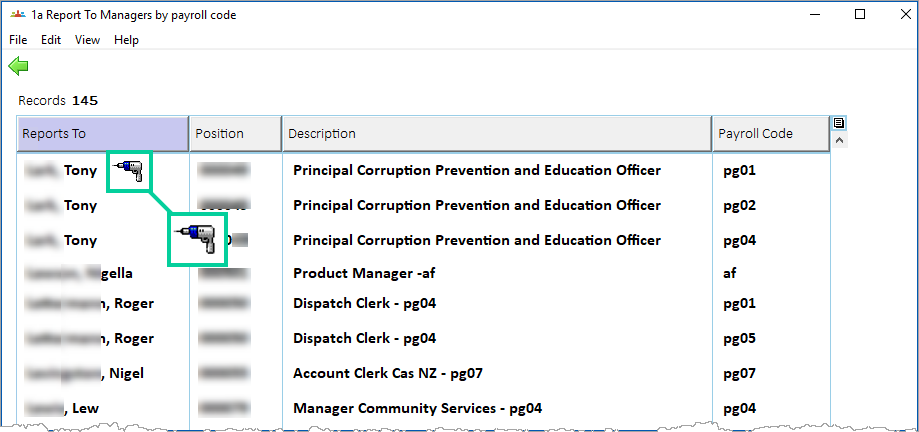
1. At the query results window, when you:
1. move your cursor over a field in a drill-down column, a drill icon appears
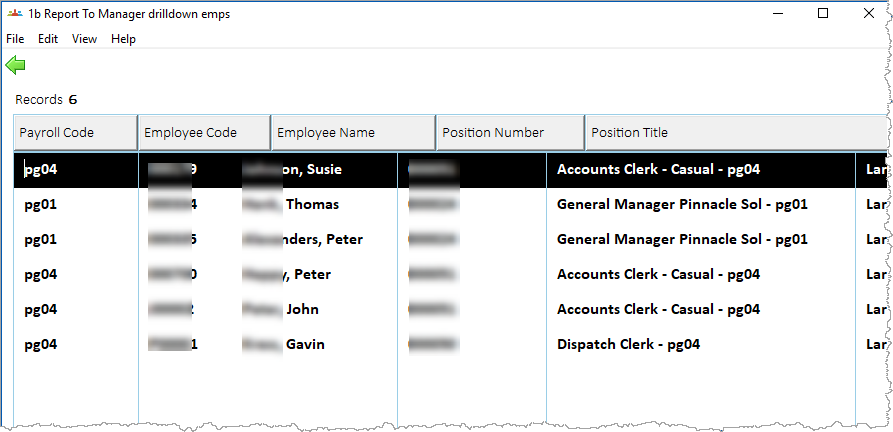
2. double-click a field showing a drill icon, EmpowerHR passes the nominated fields on the selected row as parameters to the drill-down query. In our example, after double-clicking **Tony...**, EmpowerHR passes the **Reports To** to the **1b Report To Manager drill-down emps** query, executing the query to display the results of the drill-down query (employees reporting to Tony...).
| **Case study: applying further drill-downs**
On a YTD salary breakdown query, David wants to further break down the dates on which the payments are made. He defines a drill-down that passes the Employee Code and Payment Description to another query.
Alternatively, he can drill up by passing just the Payment Description to another query that displays the total expenditure on the Payment Description for the organisation. |
| --- |
| Next topic
[Service configuration and administration](/articles/ehr-user-guide/service-configuration-and-administration) |
| --- |
© 2023 Fusion5. All rights reserved.