---
title: "Requested jobs maintenance"
id: "requested-jobs-maintenance"
project: "EHR User Guide"
url: "https://help.cloud5.com.au/articles/ehr-user-guide/requested-jobs-maintenance"
updated: 2026-10-19T00:54:25Z
---
# Requested jobs maintenance
Periodically clearing old, unwanted job records from the Requested Jobs screen helps keep the system running efficiently. EmpowerHR's Delete Requested Jobs routine is a quick and easy way to do a cleanup.
And, if you want to retain some jobs for later review, no problem. You simply go to the Requested Jobs to Keep screen and flag those jobs so they are kept.
## Maintain requested jobs
### Keep the jobs you don't want to delete
To keep a job:
1. Go to **Background Jobs** > **Requested Jobs** > **Requested Jobs to Keep**.
2. At the **Requested Jobs to Keep** screen, click **Find Now** to list all existing background jobs.
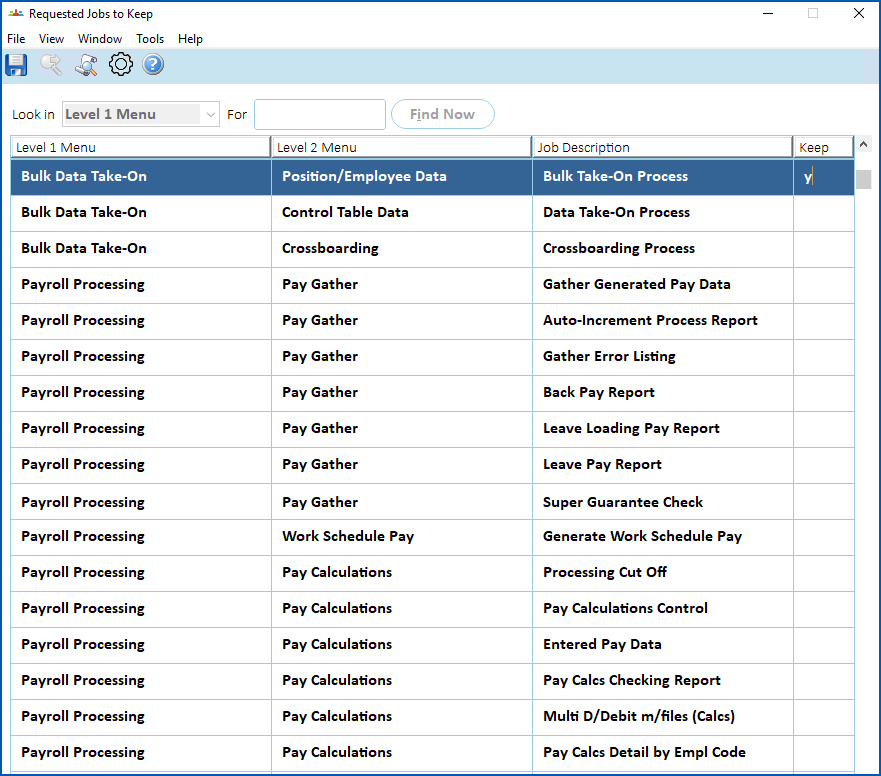
1. Select a job you want to keep, and then enter **y** in the **Keep** column.
2. Repeat this procedure, starting from step 3, until you've flagged all the jobs you want to keep.
3. Click **Save**.
### Delete the unwanted jobs
To delete unwanted jobs:
1. Go to **Background Jobs** > **Requested Jobs** > **Delete Requested Job** **s**.
2. At the **Delete Requested Jobs** screen, in:
1. **Number of Months**, enter how far back before today you want to clear the jobs
2. **Reports in Status**, select the status of the jobs you want to clear (*or* select **All Jobs**) from the dropdown list
3. **By Operator**, select **yes** from the dropdown list if you want to clear jobs you've run, *or* select **no** to clear jobs for all operators
4. **Delete Report Files**, select **yes**from the dropdown list to clear report files, *or* select **no** to not clear them
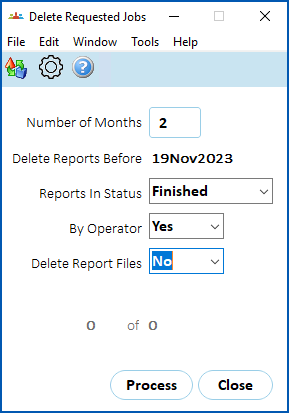
1. Click **Process**. EmpowerHR clears (deletes) the jobs according to your selections/entries, and retains any jobs flagged to keep.
| Next topic
[Self service administration](/articles/ehr-user-guide/self-service-administration) |
| --- |
© 2023 Fusion5. All rights reserved.