---
title: "Payment code STP categories"
id: "payment-code-stp-categories"
project: "EHR User Guide"
url: "https://help.cloud5.com.au/articles/ehr-user-guide/payment-code-stp-categories"
updated: 2026-10-19T00:53:52Z
---
# Payment code STP categories
When you create (or update) a payment code, you flag whether to include it in Single Touch Payroll reporting. 
When you set the **Include in STP?** flag to **y** (yes), EmpowerHR displays the **Payment Codes** pop-up window where you select from the relevant STP-defined payment categories.
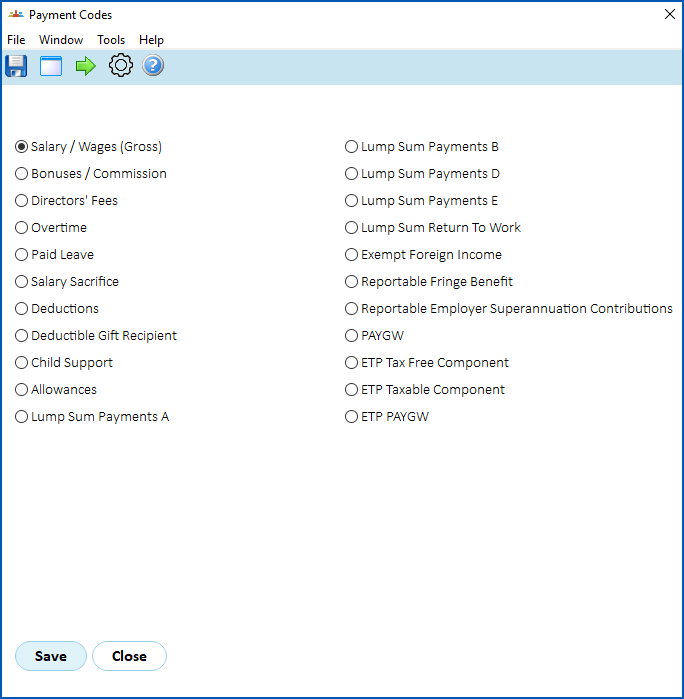
Depending on your selection, EmpowerHR may prompt you to provide more information.
Here are two examples:
### Example 1
In this first example, when you select **Paid Leave**, the **STP Payment Typ**e field displays a dropdown list of items to choose from.

### Example 2
In this second example, when you select **Other** on the **Payment Codes** detail screen, you'll see **Add To Box** and **Subtract From Box** display on the **Payment Codes** pop-up window.

| Next topic
[Payment code accounts (GL)](/articles/ehr-user-guide/payment-code-accounts) |
| --- |
© 2023 Fusion5. All rights reserved.