---
title: "Pay tab"
id: "pay-tab"
project: "EHR User Guide"
url: "https://help.cloud5.com.au/articles/ehr-user-guide/pay-tab"
updated: 2026-10-19T00:54:25Z
---
# Pay tab
Here’s an example of the **Installation Constants** - **Pay** tab.
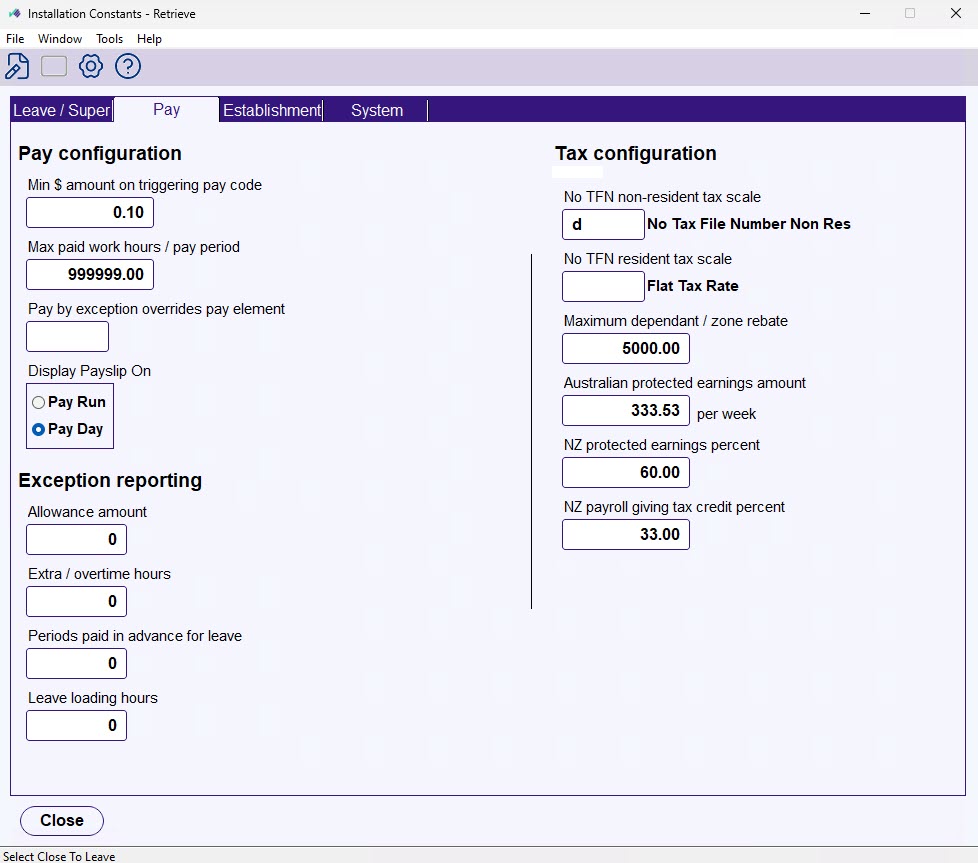
Here’s a description of each field on the **Pay** tab.
| **Field** | **Description** |
| --- | --- |
| **Pay Configuration** |
| Min $ amount on triggering pay code | This amount is used for:- Fixed amount allowances – the minimum $ amount (of the trigger pay element) before the allowance is generated.
|  | Hours-based allowances still generate on the basis of hours and not $ value. |
| --- | --- |
- Fixed amount deductions/transactions - the minimum activating pay (all payments and allowances for the pay period not generated from regular transactions) before the transaction is generated.
|  | Percentage-based transactions still generate on the basis of the pay element amounts. |
| --- | --- | |
| Max paid work hours / pay periods | This is the maximum number of hours that can be input for a pay period. |
| Pay by exception overrides pay element | The pay element code that holds the payment codes to use (with the [installation option](/articles/ehr-user-guide/installation-options), **Normal hours pay element usage (nheu)**), for normal hours validation or PBE override in pay data entry.PBE = Pay by Exception |
| Display payslip on | Controls when a payslip becomes visible in Employee Self Service after a pay run is finalised.- Pay run – employess see their payslip as soon as you finalise the pay run.
- Pay day – employees see their payslip from 12am on the pay date (server time). Before then, the payslip shows in their list but it's greyed out with an information icon.
Default is **Pay run**.
|  | This setting applies to all employees across all payrolls. |
| --- | --- | |
| **Exception reporting** |
| Allowance amount | The maximum $ amount of allowances payable to an employee in one pay period without producing a warning on the exceptional hours report. |
| Extra / overtime hours | The maximum number of extra/overtime hours payable to an employee in one pay period without producing a warning on the exceptional hours report. |
| Periods paid in advance for leave | The maximum number of pay periods payable in advance to an employee in one pay period without producing a warning on the exceptional hours report. |
| **Tax configuration** |
| No TFN non-resident tax scale | Tax changes in July 2000 varied the rounding of tax paid for payees with and without TFNs . Codes in these two fields identify the tax scale codes used for no-TFN Tax Scales, so different rounding calculations can be applied only to these scales.TFN = Tax File Number |
| No TFN resident tax scale |
| Maximum dependant / zone rebate | The maximum tax rebate that can be recorded against an employee.
|  | If you want EmpowerHR to ignore this limit, change the severity level for the field error validation. See [field error validation](/articles/ehr-user-guide/field-error-validation) for instructions. |
| --- | --- | |
| Australian protected earnings amount | The weekly APE (Australian Protected Earnings) amount relevant to employees who pay child support. In the pay calc stage, this amount is calculated up to a per period amount.The Protected Earnings Amount (PEA) is the part of an employee or contractor’s pay exempt from child support deductions (source: Services Australia). |
| NZ protected earnings percent | Not used for Australian payroll. |
| NZ payroll giving tax credit percent | Not used for Australian payroll. |
| Next topic
[Establishment tab](/articles/ehr-user-guide/establishment-tab) |
| --- |
© 2023 Fusion5. All rights reserved.