---
title: "Min and max daily hour codes"
id: "min-and-max-daily-hour-codes"
project: "EHR User Guide"
url: "https://help.cloud5.com.au/articles/ehr-user-guide/min-and-max-daily-hour-codes"
updated: 2026-10-19T00:54:23Z
---
# Min and max daily hour codes
## Create a minimum and maximum daily hour code
To create a minimum and maximum daily hour code:
1. Go to **Control Tables** > **Relief and Payments** > **Minimum and Maximum Daily Hour**.
2. At the **Minimum and Maximum Daily Hour** **** summary screen, click **Find Now** to list all existing codes.
3. Click **New**.
4. At the **Minimum and Maximum Daily Hou** **r** **** detail screen, in:
1. **Employment Group Type**, enter a the employment group code if you know it, or click **Window**, find and double-click the code to add it to the field
2. **Minimum Hours**, enter the minimum number of hours for which a relief and additional hours request can be created
3. **Maximum Hours**, enter the maximum number of hours for which a relief and additional hours request can be created
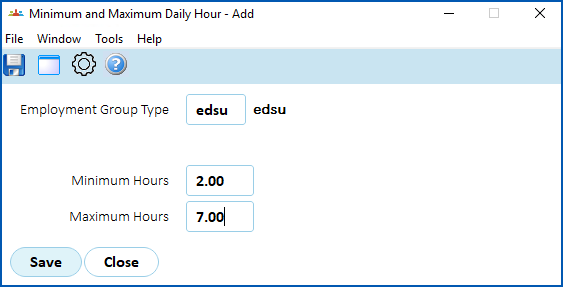
1. Click **Save**.
| Next topic
[Official relief reasons codes](/articles/ehr-user-guide/official-relief-reasons-codes) |
| --- |
© 2023 Fusion5. All rights reserved.