---
title: "Maintain casual relief staff list"
id: "maintain-casual-relief-staff-list"
project: "EHR User Guide"
url: "https://help.cloud5.com.au/articles/ehr-user-guide/maintain-casual-relief-staff-list"
updated: 2026-10-19T00:53:01Z
---
# Maintain casual relief staff list
In MSS, you can review information about casuals who prefer to work at your school and set a ranking which EmpowerHR uses to prioritise staff who are available to fill a vacancy at your school.
Preferred staff and new staff are given a higher priority than other staff with the same qualifications, while blocked staff are not considered.
To review and maintain the casual relief staff list:
1. Go to **Casual Relief** > **Casuals**.
2. EmpowerHR displays the **Casuals**screen.
3. At the **Search Filter**, make your selections.
4. Click **Search**. EmpowerHR displays the casuals who meet your selection criteria.
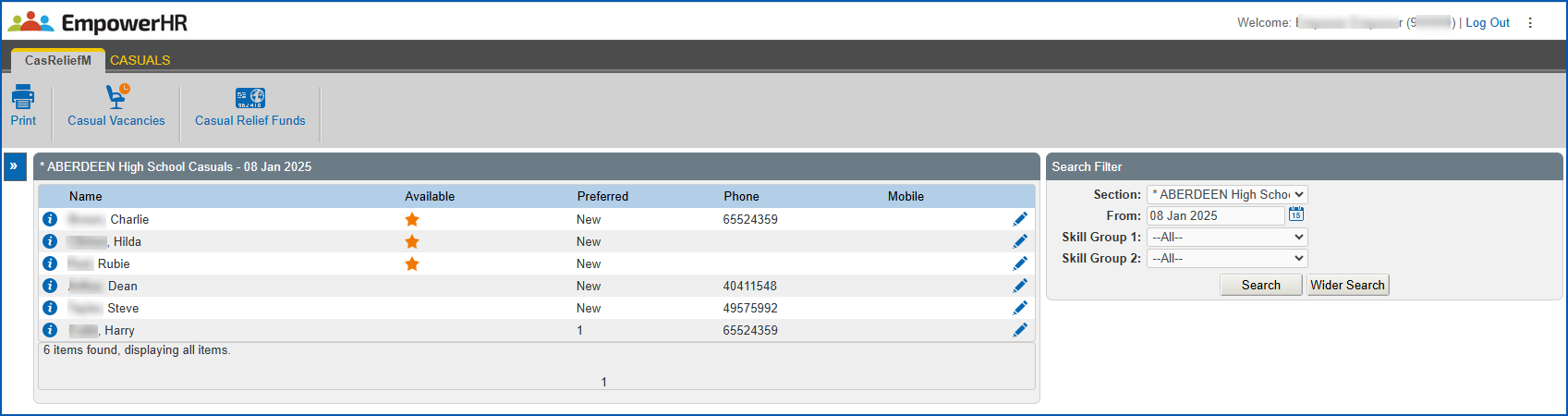
1. Click **Change**.
2. EmpowerHR displays the **Casual Profile for...** screen.
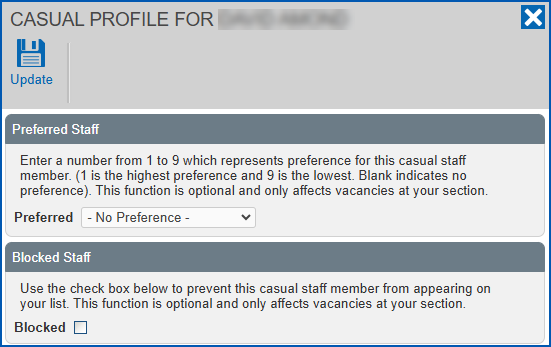
1. Review the information
2. If you want to set a ranking for (or block) the casual staff member, then:
1. at **Preferred Staff**, select a ranking from the **Preferred** dropdown list, *or*
2. at **Blocked Staff**, select the **Blocked** checkbox to omit the person from your casual relief staff list
1. Click **Update**.
| Next topic
[Manage casual relief vacancies](/articles/ehr-user-guide/manage-casual-relief-vacancies) |
| --- |
© 2023 Fusion5. All rights reserved.