---
title: "LSL accrual processes"
id: "lsl-accrual-processes"
project: "EHR User Guide"
url: "https://help.cloud5.com.au/articles/ehr-user-guide/lsl-accrual-processes"
updated: 2026-10-19T00:53:07Z
---
# LSL accrual processes
## Run LSL accruals
You can run (calculate) LSL accruals:
* at any date
* for one employee
* for all employees
* by specific leave type
* by all leave types
* by specific leave code
* by all leave codes
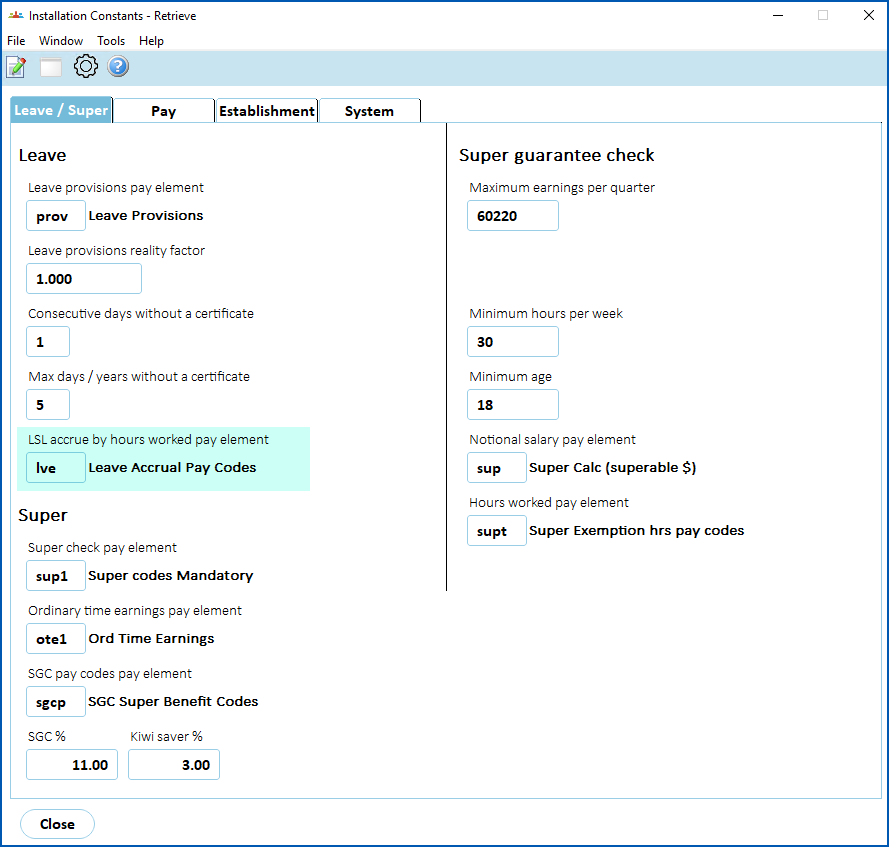
While similar to timesheet accrual of normal leave, accruals by actual hours worked operate a little differently. EmpowerHR requires a pay element to define the kinds of pay on which hours worked generate an accrual. You set the pay element in the **LSL accrue by hours worked pay element** field on the **Installation Constants** screen.
[+] [Show example: LSL accrue by hours worked pay element field](javascript:void%280%29)
[-] [Hide example: LSL accrue by hours worked pay element field](javascript:void%280%29)
EmpowerHR:
* counts the total hours paid in a period and compares them with the standard hours on the classification
* calculates an average % full time for the accrual period
* adjusts the paid leave credit accordingly
|  | For casual employees' LSL, you can use the installation option called **apply hours multiplier to LSL accruals (lslm)** to apply a multiplying factor to particular payment codes. |
| --- | --- |
To run (calculate) LSL accruals:
1. Go to **Tasks** > **Leave** > **Leave Accruals and Rules**> **Long Service Accruals**.
2. At **Long S** **ervice Accruals**, enter a date in the **Accrue Upto Date** field, and complete any other fields.
|  | We recommend you:
- don't leave the screen blank (make no entries). If you do, EmpowerHR will run every LSL accrual for every employee up to the current date.
- don't enter a future date as the Accrue Upto Date. You should enter a past date instead. Entering a future date will generate a warning as it can affect other functionality such as termination leave calculations.
- don't enter a date later than the last completed pay period if you use hours for accruals. Otherwise, hourly accruing employees could miss out on some of their accruals.
|
| --- | --- |
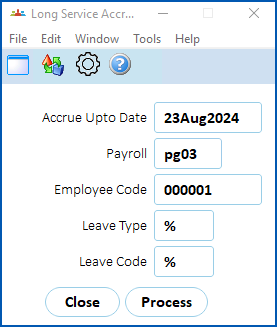
1. Click **Process**.
2. When EmpowerHR finishes, **Processing Successful** displays at the bottom of the **Long Service Accruals** screen.
3. Click **Close**.
## Reset LSL accruals
You use the same procedure to reset normal leave and long service leave. See leave accrual processes - [reset leave accruals](/articles/ehr-user-guide/leave-accrual-processes/a/h2__429885908) - for instructions how.
| Next topic
[LSL reporting](/articles/ehr-user-guide/lsl-reporting) |
| --- |
© 2023 Fusion5. All rights reserved.