---
title: "Leave taken reason codes"
id: "leave-taken-reason-codes"
project: "EHR User Guide"
url: "https://help.cloud5.com.au/articles/ehr-user-guide/leave-taken-reason-codes"
updated: 2026-10-19T00:53:56Z
---
# Leave taken reason codes
You can create as many leave taken reason codes as you need. See [leave taken reasons](/articles/ehr-user-guide/leave-taken-reasons) for ideas about how you define and apply them.
## Create a leave taken reason
[](https://clipchamp.com/watch/P0OimyFE69s?utm_source=embed&utm_medium=embed&utm_campaign=watch)
To create a leave taken reason:
1. Go to **Control Tables** > **Leave** > **Leave Taken Reason**.
2. At the **Leave Taken Reason** **** summary screen, click **New**.
3. At the **Leave Taken Reason** detail screen, make your selections and entries in the [leave taken reason fields](/articles/ehr-user-guide/leave-taken-reason-fields).
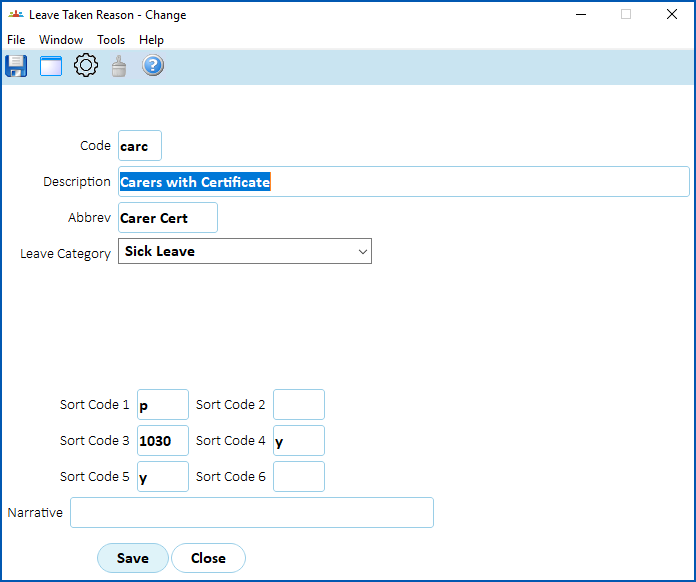
4. Click **Save**.
##
|  | To learn how to make specific leave taken reasons available to choose from when anyone creates a compassionate/bereavement leave request in Self Service, see [use a leave element to link leave reasons to compassionate leave requests](/articles/ehr-user-guide/leave-element-codes/a/h2__357196934). |
| --- | --- |
| Next topic
[Leave taken reason fields](/articles/ehr-user-guide/leave-taken-reason-fields) |
| --- |
© 2023 Fusion5. All rights reserved.