---
title: "Integration to PLUM super"
id: "integration-to-plum-super"
project: "EHR User Guide"
url: "https://help.cloud5.com.au/articles/ehr-user-guide/integration-to-plum-super"
updated: 2026-10-19T00:53:48Z
---
# Integration to PLUM super
## What is the PLUM super integration?
EmpowerHR has a standard SAFFE file. Different super funds require different fields from the file. We offer a customised EmpowerHR feature which allows you to transfer employees to the PLUM Super Fund and use the PLUM portal to lodge files.
##### SAFFE = SuperStream Alternative File Format Extended
For insurance-related calculations, PLUM needs to identify if an employee is on wages or is salaried, and requires this indicator to appear in the **Occupational Description** field on the SAFFE (column 76 or BX).
One payroll holds all wage employees, while another payroll holds all salaried employees.
EmpowerHR:
* identifies employees as wages or salary
* applies a business rule to output the description to column 76 or BX
| This feature is located in the desktop at:
- Administration > Agency Management > Installation Settings
- Background Jobs > Payroll Processing > Interfaces > SAFFE Super File
|
| --- |
## How to configure settings for using the customised SAFFE file
EmpowerHR’s installation settings are:
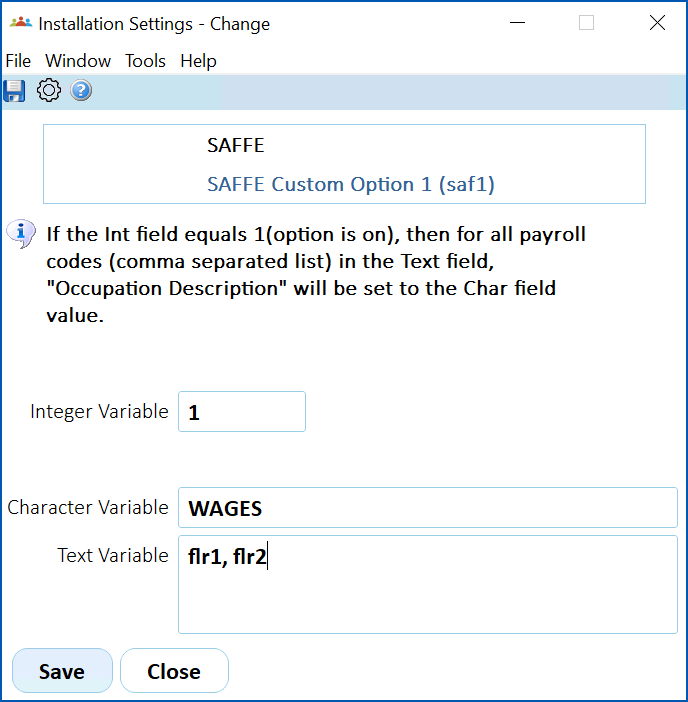
* SAFFE Custom Option 1 (saf1)
* SAFFE Custom Option 2 (saf2)
The SAFFE program (criosafe) identifies when you are using an installation setting (Integer Variable field is set to 1 - meaning the option is on), and then:
* retrieves the value from the installation setting’s Text Variable field
* sets the Occupation Description field on the SAFFE (column 76 or BX) to the value in the installation setting’s Character Variable field
### Configure saf1
To configure the saf1 installation setting:
1. Go to **Administration** > **Agency Managemen** **t** > **Installation Settings**.
2. At:
1. **Integer Variable**, enter **1** to switch the option on
2. **Character Variable**, this text appears in the **Occupation Description** field on the SAFFE
3. **Text Variable**, enter the payroll codes the change applies to
3. Click **Save**.
[+] [Show example: saf1 settings](javascript:void%280%29)
[-] [Hide example: saf1 settings](javascript:void%280%29)
####
In payroll flr1, we have employees:
* Amaya Cochran
* Danny Serrano
In payroll flr2, we have employees:
* Allie Lim
* Cal Goodwin
### Configure saf2
To configure the saf2 installation setting:
1. Go to **Administration** > **Agency Management** > **Installation Settings**.
2. At:
1. **Integer Variable**, enter **1** to switch the option on
2. **Character Variable**, this text appears in the **Occupation Description** field on the SAFFE
3. **Text Variable**, enter the payroll codes the change applies to
3. Click **Save**.
[+] [Show example: saf2 settings](javascript:void%280%29)
[-] [Hide example: saf2 settings](javascript:void%280%29)
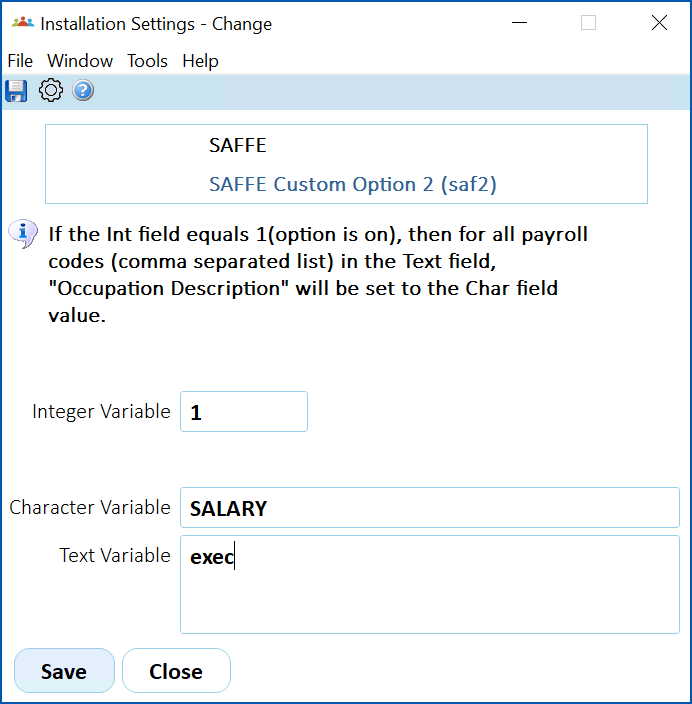
In payroll **exec**, we have employees:
* Shiloh Booth
* Chaim Bryan
EmpowerHR runs SAFFE for all payrolls and produces the results:
* Allie Lim – WAGES
* Amaya Cochran – WAGES
* Cal Goodwin – WAGES
* Chaim Bryan – SALARY
* Danny Serrano – WAGES
* Shiloh Booth - SALARY
| Next topic
[UKG integration](/articles/ehr-user-guide/ukg-integration) |
| --- |
© 2023 Fusion5. All rights reserved.