---
title: "How to manage your registrations"
id: "how-to-manage-your-registrations"
project: "EHR User Guide"
url: "https://help.cloud5.com.au/articles/ehr-user-guide/how-to-manage-your-registrations"
updated: 2026-10-19T00:54:08Z
---
# How to manage your registrations
As an employee, you can create, save, edit, and submit a compliance registration request from ESS .
ESS = Employee Self Service
When you submit a request, the compliance workflow is triggered, so you can no longer edit the request but you can view it at any time.
Once a registration request has passed to the end of the workflow and is granted final approval, the compliance certificate is current.
When a current certificate nears expiry, you can renew it by submitting a renewal request.
## ESS compliance registration summary screen
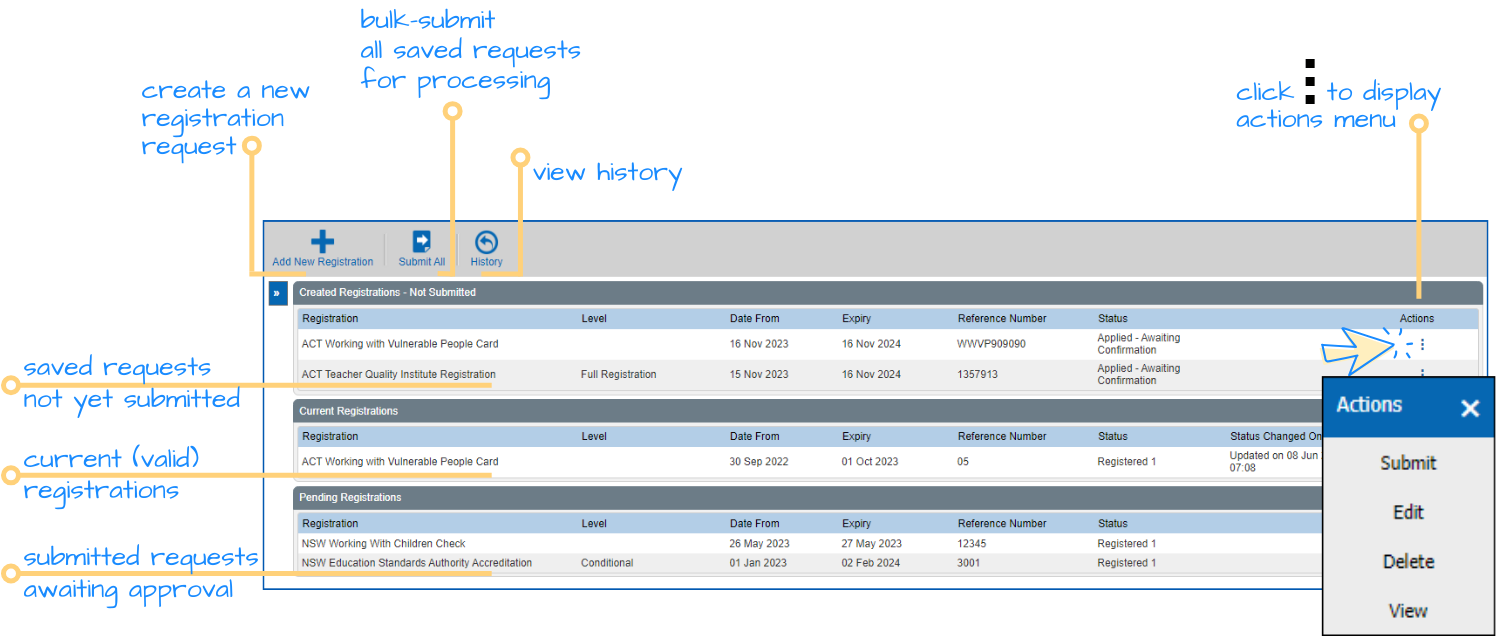
Here's where you manage your compliance registrations in ESS.
| Next topic
[Create a registration request](/articles/ehr-user-guide/create-a-registration-request) |
| --- |
© 2023 Fusion5. All rights reserved.