---
title: "Flexi time balances"
id: "flexi-time-balances"
project: "EHR User Guide"
url: "https://help.cloud5.com.au/articles/ehr-user-guide/flexi-time-balances"
updated: 2026-10-19T00:53:16Z
---
# Flexi time balances
## Adjust flexi time balances
You can adjust flexi time balances for an employee's most recent approved timesheet.
To adjust flexi time balances:
1. Go to **Flexi Time** > **Administration** > **Manage Flexi Time Balances**.
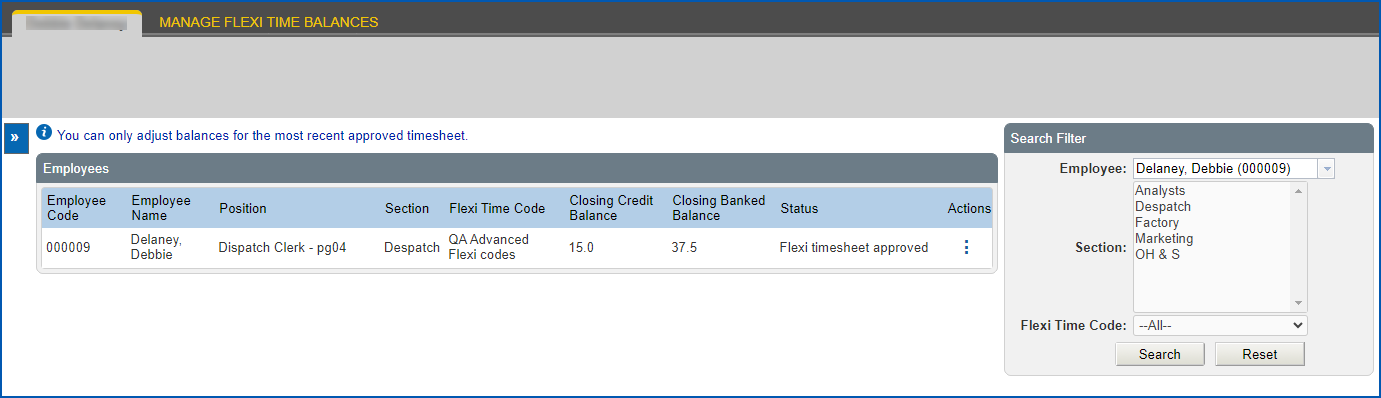
2. At the **Employees** catalogue, go to the **Search Filter** and at Employee, enter the employee’s surname (as you type, any names that match your entry display in a dropdown list to choose from), and then click **Search**.
3. EmpowerHR retrieves the employee's last submitted timesheet.
|  | If the employee does not have:
- any submitted timesheets, EmpowerHR retrieves their first saved timesheet and allows you to go ahead with adjusting the opening balances
- any timesheets, no records are displayed and you cannot take any action
|
| --- | --- |
1. Click **Actions**, and then select **Edit** from the menu.
2. At Flexi Balances, enter the adjusted hours in one or both of the following fields:
1. **Closing Credit Balance**
2. **Closing Banked Balanc** **e**
**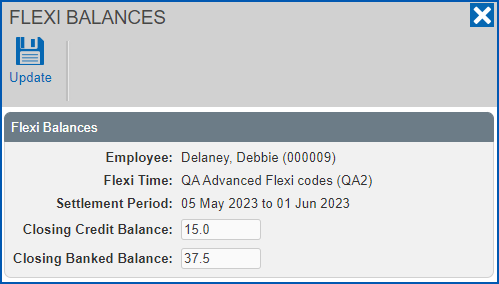**
1. Click **Update**. Your changes will update the opening balance of the employee's next timesheet in the next settlement period.
| Next topic
[Time capture systems](/articles/ehr-user-guide/time-capture-system) |
| --- |
© 2023 Fusion5. All rights reserved.