After creating a form template that has either Finalise? (y/n) or Workflow? (y/n) set to y, when you change (open) the template, you'll see EmpowerHR displays the Finalise SQL button at the bottom of the screen. This is to allow you to add SQL to run when a user finalises the form (or, the form workflow is finalised) in self service.
 | EmpowerHR only displays the Finalise SQL button in change mode, not in add mode. |
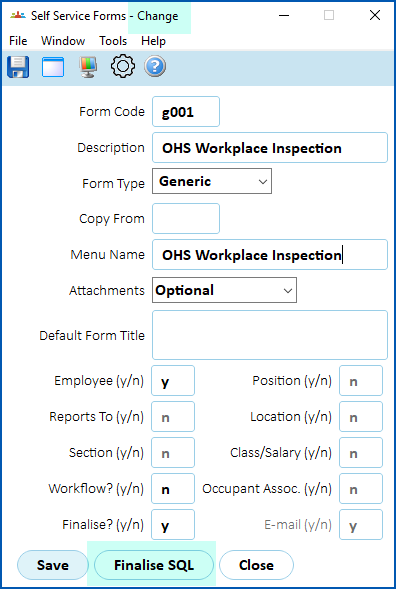
To add finalise SQL to a form template:
- Click Finalise SQL.
- The Finalise SQL - Change detail screen displays.
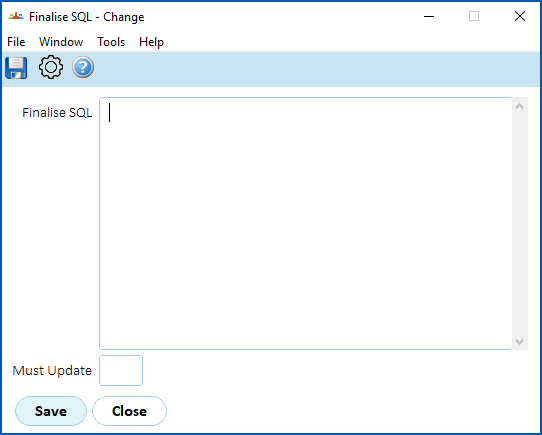
- At the Finalise SQL field:
- write statements starting with Insert / Update / Delete and Call SQL (all other SQL is invalid)
- separate multiple statements with a semi-colon
|
|
Validation checks that statements start with Insert / Update / Delate and Call, but does not check if the SQL is correct. |
- At the Must Update field, enter y (yes) or n (no). If you enter:
- y, when the finalise SQL is run, at least 1 row must be inserted/updated
- n, when the finalise SQL is run, if there are no inserted/updated rows, this is acceptable
- Click Save. EmpowerHR runs the SQL when the form is finalised in self service.
© 2023 Fusion5. All rights reserved.