---
title: "Finalise SQL for a form template"
id: "finalise-sql-for-a-form-template"
project: "EHR User Guide"
url: "https://help.cloud5.com.au/articles/ehr-user-guide/finalise-sql-for-a-form-template"
updated: 2026-10-19T00:53:44Z
---
# Finalise SQL for a form template
After creating a form template that has either **Finalise? (y/n)** or **Workflow? (y/n)** set to **y**, when you change (open) the template, you'll see EmpowerHR displays the **Finalise SQL** button at the bottom of the screen. This is to allow you to add SQL to run when a user finalises the form (or, the form workflow is finalised) in self service.
|  | EmpowerHR only displays the **Finalise SQL** button in **change** mode, not in **add** mode. |
| --- | --- |
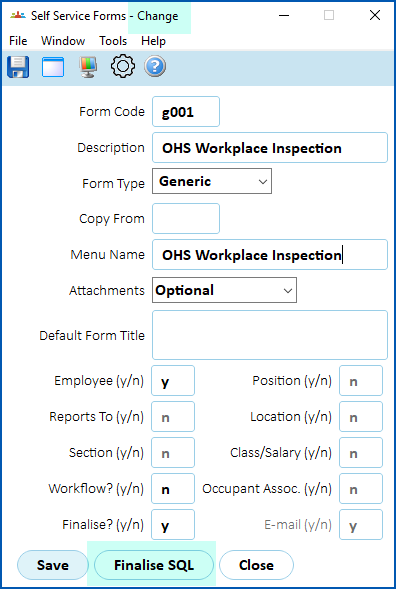
To add finalise SQL to a form template:
1. Click **Finalise SQL**.
2. The **Finalise SQL - Change** detail screen displays.
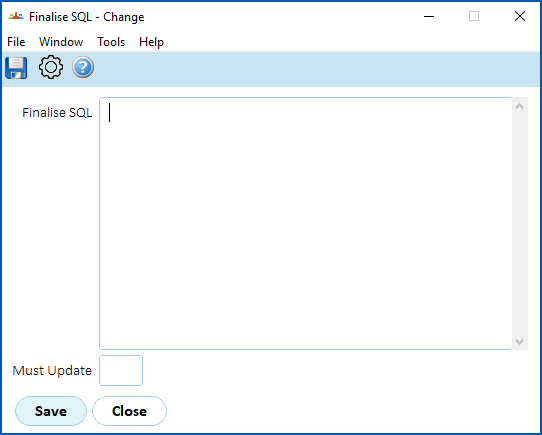
1. At the **Finalise SQL** field:
1. write statements starting with **Insert** / **Update** / **Delete** and **Call SQL** (all other SQL is invalid)
2. separate multiple statements with a semi-colon
|  | Validation checks that statements start with **Insert** / **Update** / **Delate** and **Call**, but does not check if the SQL is correct. |
| --- | --- |
1. At the **Must Update** field, enter **y** (yes) or **n** (no). If you enter:
1. **y**, when the finalise SQL is run, at least 1 row must be inserted/updated
2. **n**, when the finalise SQL is run, if there are no inserted/updated rows, this is acceptable
2. Click **Save**. EmpowerHR runs the SQL when the form is finalised in self service.
| Next topic
[Use self service forms](/articles/ehr-user-guide/use-self-service-forms) |
| --- |
© 2023 Fusion5. All rights reserved.