---
title: "Edit a registration request"
id: "edit-a-registration-request"
project: "EHR User Guide"
url: "https://help.cloud5.com.au/articles/ehr-user-guide/edit-a-registration-request"
updated: 2026-10-19T00:54:07Z
---
# Edit a registration request
You can edit a registration request as many times as you like before submitting it for processing.
|  | You can only **delete** a registration request that appears in either of the following lists:
- Created Registrations - Not Submitted
- Pending Requests
|
| --- | --- |
To edit a registration request (saved but not yet submitted for processing): 
1. Click **Compliance Registration**.
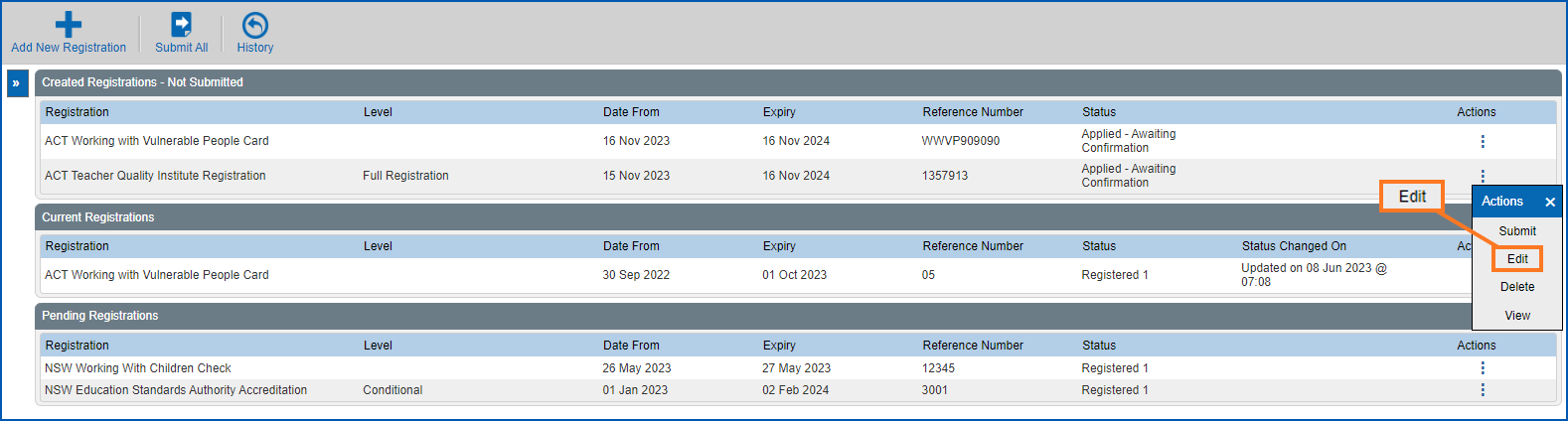
2. At the **Compliance Registration**summary screen, go to the **Created Registrations - Not Submitted** list.
3. On the row showing the request you want to edit, click **Actions** and then select **Edit** from the menu..
1. At the **Registration Request** details screen, make the changes you want. See the following topics for help:
* [NESA fields](/articles/ehr-user-guide/nesa-request-fields)
* [TQI fields](/articles/ehr-user-guide/tqi-request-fields)
* [WWCC and WWVP fields](/articles/ehr-user-guide/wwcc-and-wwvp-request-fields)
1. Click **Save**.
| Next topic
[Submit a registration request](/articles/ehr-user-guide/submit-a-registration-request) |
| --- |
© 2023 Fusion5. All rights reserved.