---
title: "Deduction agency bank details codes"
id: "deduction-agency-bank-details-codes"
project: "EHR User Guide"
url: "https://help.cloud5.com.au/articles/ehr-user-guide/deduction-agency-bank-details-codes"
updated: 2026-10-19T00:53:11Z
---
# Deduction agency bank details codes
Deduction agency bank detail codes are used to define external parties' bank accounts your organisation uses to make external payments such as superannuation, etc.
## Create a deduction agency bank details code
To create an deduction agency bank details code:
1. Go to **Control Tables** > **Payroll** > **Deduction Agency Bank Details**.
2. The **Deduction Agency Bank Details** summary screen displays.
3. Click **Find Now** to display a list of existing codes.
4. Click **New**.
5. At the **Deduction Agency Bank Details (add)** detail screen, make your entries using the following table as a guide.
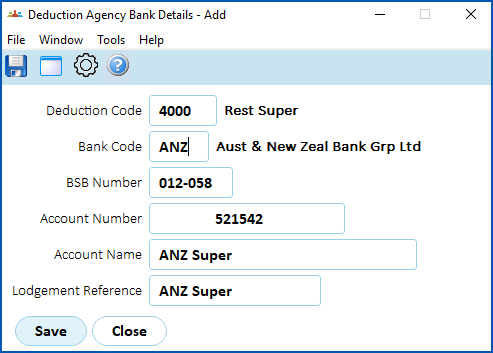
| **At this field...** | **Do this...** |
| --- | --- |
| Deduction Code | Click **Window**, find and double-click the deduction code to add it to the field. |
| Bank Code | Click **Window**, find and double-click the bank code to add it to the field. |
| BSB Number | Click **Window**, find and double-click the BSB number to add it to the field. |
| Account Number | Enter the account number. |
| Account Name | Enter the account name. |
| Lodgement Reference | Enter a reference to indicate the origin of the entry (maximum 18 characters). Financial institutions use this reference on statements. |
1. Click **Save**.
| Next topic
[Division codes](/articles/ehr-user-guide/division-codes) |
| --- |
© 2023 Fusion5. All rights reserved.