---
title: "Crossboard gender diversity data"
id: "crossboard-gender-diversity-data"
project: "EHR User Guide"
url: "https://help.cloud5.com.au/articles/ehr-user-guide/crossboard-gender-diversity-data"
updated: 2026-10-19T00:52:36Z
---
# Crossboard gender diversity data
If you need to update gender diversity data for existing employees, the following instructions show how to use EmpowerHR's desktop crossboarding feature.
|  | See [crossboard gender diversity data file format](/articles/ehr-user-guide/crossboard-gender-diversity-data-file-format) for guidance on preparing the data file. |
| --- | --- |
To crossboard (update) existing employees' gender diversity data: 
1. Go to **Background Jobs** > **Bulk Take-on** > **Crossboarding** > **Crossboarding Initiation**.
2. At the **Crossboarding Initiation** screen, make sure:
1. option **1. Employee Personal data updates** is selected
2. **Gender Diversity** is the selected **Load Type**
3. At **File Name**, click **Open File**, navigate to, and select your data file to add the pathname to the **File Name** field.
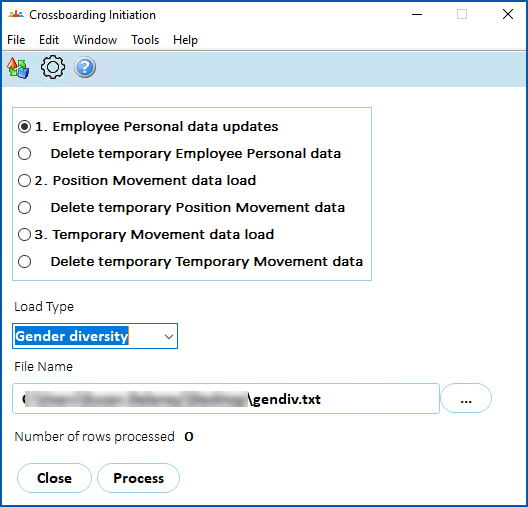
1. Click **Process**.
|  | When you click **Process**, the Number of rows processed counter displays how many records have been uploaded into temporary tables. |
| --- | --- |
1. Go to **Background Jobs**> **Bulk Take-on** > **Crossboarding**> **Crossboarding Process**.
2. At the **Crossboarding Process** screen, complete any required fields,
3. Click **Save** to start processing the data.
4. To check the status of the job, go to **Background Jobs** > **Requested Jobs** > **Requested Jobs**.
EmpowerHR displays in the **Crossboard Approval/Error Fix** screen, the details of any employees with errors in their crossboarded gender diversity data. From there you can correct the data. See [fix crossboarding errors](/articles/ehr-user-guide/fix-crossboarding-errors) for more information.
| Next topic
[Crossboard gender diversity data file format](/articles/ehr-user-guide/crossboard-gender-diversity-data-file-format) |
| --- |
© 2023 Fusion5. All rights reserved.