---
title: "Catholic educ pay variation"
id: "catholic-educ-pay-variation"
project: "EHR User Guide"
url: "https://help.cloud5.com.au/articles/ehr-user-guide/catholic-educ-pay-variation"
updated: 2026-10-19T00:52:52Z
---
# Catholic educ pay variation
Run this report at the Pay Calculations stage to check for pay variances between the current and previous pay periods.
To run the catholic educ pay variation  report (**xsch004k**):
A variation occurs when an employee meets conditions for Formula 1 or Formula 2.
1. Go to **Background** **Jobs**>**School** > **Schools Reporting** > **Catholic Educ Pay Variation**.
2. At the **Catholic Educ Pay Variation**screen, complete the fields using the following table as a guide.
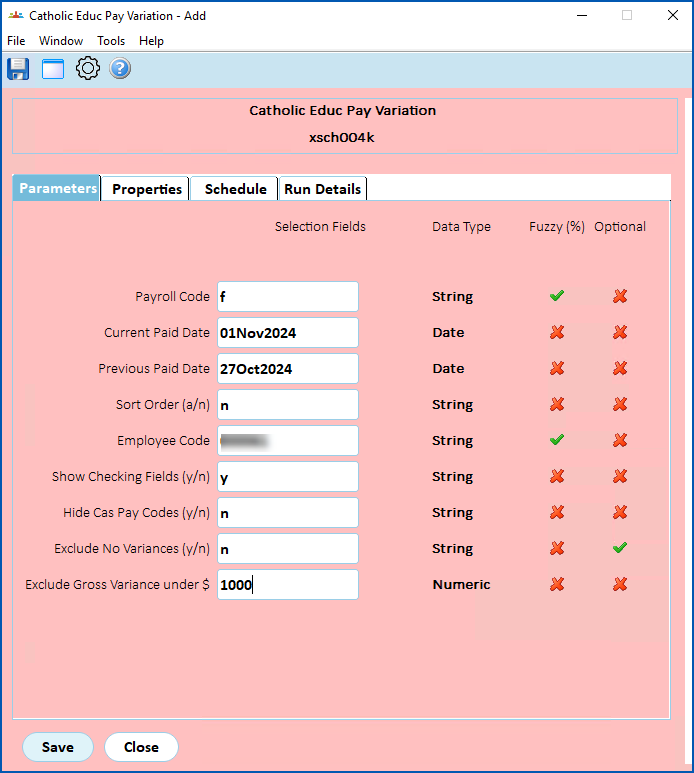
| **At this field...** | **Do this...** |
| --- | --- |
| Payroll Code | Enter:
- an individual Payroll Code, or
- % to report on all payroll codes
|
| Current Paid Date | Enter the current paid date |
| Previous Paid Date | Enter previous paid date |
| Sort Code | Enter:
- n to sort the report data numerically, or
- a to sort the report data alphabetically
|
| Employee Code | Enter:
- an individual employee code, or
- % to report on all employees
|
| Show Checking Fields (y/n) | Enter:
- y to show checking fields in the report
- n to exclude checking fields from the report
|
| Hide Cas Pay Codes (y/n) | Enter:
- y to exclude cas pay codes from the report
- n to show cas pay codes in the report
|
| Exclude No Variances flag (y/n) | Enter:
- y to exclude employees who have no variances from the report
- n to include employees who have no variances
|
| Exclude Gross Variance $ | Enter a dollar amount below which gross variances will be excluded from the report. |
1. Click **Save**. EmpowerHR runs the report.
2. Go to **Background Jobs**>**Requested Jobs**> **Requested Jobs**to see the report.
| Next topic
[Catholic educ work patterns](/articles/ehr-user-guide/catholic-educ-work-patterns) |
| --- |
© 2023 Fusion5. All rights reserved.