---
title: "Bulk update regular transactions"
id: "bulk-update-regular-transactions"
project: "EHR User Guide"
url: "https://help.cloud5.com.au/articles/ehr-user-guide/bulk-update-regular-transactions"
updated: 2026-10-19T00:52:38Z
---
# Bulk update regular transactions
EmpowerHR allows you to update regular transactions in bulk to update all current regular transaction records for a specified payment code. For example, you could use this function to update the super contribution amount in bulk.
|  | If you need to apply an effective date and specified payroll, see [bulk update date-effective regular transactions](/articles/ehr-user-guide/bulk-update-date-effective-regular-transactions). |
| --- | --- |
To bulk update regular transactions (no effective date):
1. Go to **Tasks > Employees > Bulk Updates > Regular Transactions Update**~~.~~
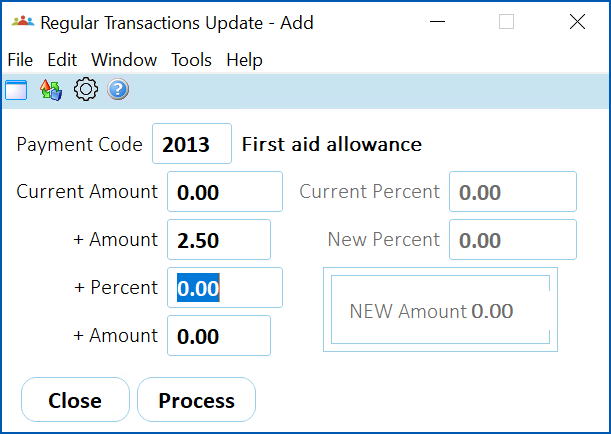
2. At the **Regular Transactions Update - Add** screen, complete the fields using the following table as a guide.
| **At this field...** | **Do this...** |
| --- | --- |
| Payment Code | Click **Window**, find and double-click the code to add it to the field. |
| Current Amount
Current Percent | When you have selected a **Payment Code** and pressed **Tab**, EmpowerHR moves your cursor to either the **Current Amount**or **Current Percent** field.
This depends on how the **Percentage Calculation** field on the payment code is set. If it's set to:
- n (no), EmpowerHR moves to the Current Amount field where you enter the current amount
- y (yes), EmpowerHR moves to the Current Percent field where you enter the current percentage amount
|
| + Amount
+ Percent
+ Amount
New Percent | Enter the new dollar amount or new percentage amount. |
| New Amount | Nothing. This is a display only field. |
1. Click **Process**. EmpowerHR overrides all current regular transaction records that match the details you specified.
| Next topic
[Bulk update date-effective regular transactions](/articles/ehr-user-guide/bulk-update-date-effective-regular-transactions) |
| --- |
© 2023 Fusion5. All rights reserved.