---
title: "Bulk update external regular allowances"
id: "bulk-update-external-regular-allowances"
project: "EHR User Guide"
url: "https://help.cloud5.com.au/articles/ehr-user-guide/bulk-update-external-regular-allowances"
updated: 2026-10-19T00:53:07Z
---
# Bulk update external regular allowances
You can update external regular allowances in bulk from an Excel spreadsheet.
## What file do I need to prepare?
You need to create an **xml** file generated from your Excel spreadsheet containing the required data.
|  | Remember to exclude column headings from the files. |
| --- | --- |
Here's the format to use. An asterisk (**\***) shows which data is mandatory.
| **Column >** | **A\*** | **B\*** | **C\*** | **D\*** | **E** | **F** | **G** |
| --- | --- | --- | --- | --- | --- | --- | --- |
| | Employee Code | Employment | Payment Code | Date From | Date Upto | Rate Per Hour | Rate Per Pay Period |
| **Characters >** | 10 | 1 | 4 | | | 8 including decimal point | 8 including decimal point |
| | | | | Format:
ddmmyy
ddMmmyy
ddmmccyy
ddMmmccyy | Format:
ddmmyy
ddMmmyy
ddmmccyy
ddMmmccyy | | |
| **Column >** | **H** | **I** | **J** | **K** | **L** | **M** | **N\*** |
| --- | --- | --- | --- | --- | --- | --- | --- |
| | Rate Per Pay Year | Fixed Amount Per Period | Trigger Element Code | Unit of Measure | Cost Centre | Comment | Suppress Retrospective Payment (y/n) |
| **Characters >** | 8 including decimal point | 8 including decimal point | 4 | 1 | 16 | 40 | 1 |
## Update external regular allowances in bulk
To bulk update external regular allowances from a spreadsheet:
1. Go to **Tasks > Employees > Employee Information > External Regular Allow Entry**.
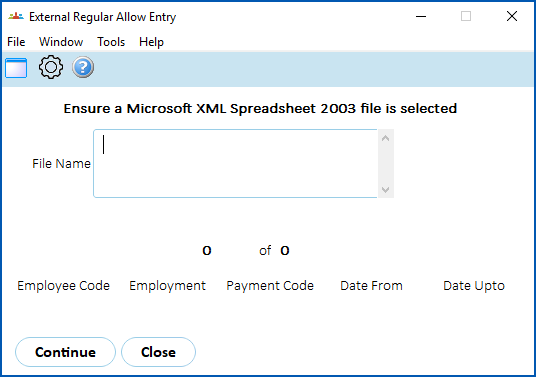
1. Click **Window** and select the spreadsheet file.
2. Click **Continue**.
3. EmpowerHR loads and validates the spreadsheet data.
4. If any data fails validation, the system displays an error log (**External Regular Allowance Entry Errors** screen).
### What happens if there is an existing regular allowance?
Here is what happens when there is an existing regular allowance for the **Employee Code**, **Employment**, and **Payment Code** which overlaps the new allowance.
If the:
* existing allowance is open-ended, *and*
* the new allowance has a **From Date** later than the existing one, *then*
* EmpowerHR closes off the existing allowance on the day before the start of the new allowance
If the:
* existing allowance has a **From Date** later than the new one, *and*
* the new allowance has an **Upto Date** later than the **From Date** of the existing one, *then*
* EmpowerHR closes the new allowance on the day before the start of the existing allowance
If there is:
* an existing allowance that is not open-ended and covers the period of the new allowance, *then*
* EmpowerHR generates an error
If there is
* more than one existing regular allowance for the **Employee Code**, **Employment**, and **Payment Code** which overlaps the new one, *then*
* EmpowerHR generates an error
| Next topic
[Bulk upload leave balances](/articles/ehr-user-guide/bulk-leave-balances) |
| --- |
© 2023 Fusion5. All rights reserved.