---
title: "Bulk upload leave balances"
id: "bulk-leave-balances"
project: "EHR User Guide"
url: "https://help.cloud5.com.au/articles/ehr-user-guide/bulk-leave-balances"
updated: 2026-10-19T00:53:49Z
---
# Bulk upload leave balances
You can upload (take on) leave balances in bulk by providing the data in a spreadsheet and using the leave take-on process. You can use this process for all types of leave except long service leave (LSL).
|  | Typically, you would only need to do this when you first implement EmpowerHR. A Fusion5 Consultant can help you with this process - make an [iHelp request](https://infusion.fusion5.com/) to get started. |
| --- | --- |
## What file do I need to prepare?
You need to create an **xml** file containing the required data.
|  | Remember to exclude column headings from the files. |
| --- | --- |
Here's the format to use. Each row should represent an employee and a leave type/code. An asterisk (**\***) shows which data is mandatory.
| **Column >** | **A\*** | **B\*** | **C** | **D\*** | **E\*** | **F\*** | **G\*** | **H\*** |
| --- | --- | --- | --- | --- | --- | --- | --- | --- |
| | Employee Code | Employment Number | Employee Position | Leave Type | Leave Code | Leave Balance | Last Accrual date | Original Last Accrual date |
| --- | --- | --- | --- | --- | --- | --- | --- | --- |
| **Characters >** | 10 | 1 | 10 | 4 | 4 | 10 including up to 5 decimal places | DDMMYY | DDMMYY |
| --- | --- | --- | --- | --- | --- | --- | --- | --- |
| **Column >** | **I\*** | **J** | **K** | **L** | **M** | **N** | **O** |
| --- | --- | --- | --- | --- | --- | --- | --- |
| | Start Accrual date | Work Pattern Code | Pubic Holiday Code | Leave Loading Value | Ignore Deferrals | Leave Reason Code | Paid Date |
| **Characters >** | DDMMYY | 4 | 4 | 10 including up to 5 decimal places | 1 | 4 | |
| | | | | | | | Must be a valid paid date for the employee's payroll. If this data is provided, only then will Leave Entitlements be populated. |
## Upload (take on) leave balances in bulk
To upload (take on) leave balances in bulk:
1. Go to **Tasks** > **Leave** > **Leave TakeOn** > **Leave Take-On**.
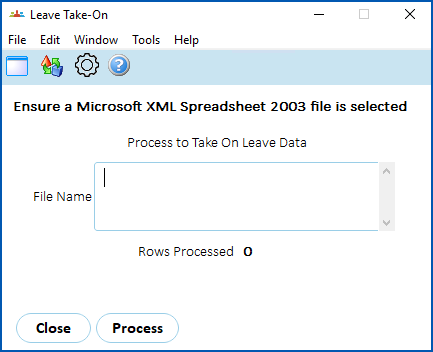
1. Click **Window** and select the spreadsheet file.
2. Click **Process**.
3. EmpowerHR loads and validates the spreadsheet data.
4. If any data fails validation, the system displays an error log.
| Next topic
[Bulk upload leave bookings](/articles/ehr-user-guide/bulk-leave-bookings) |
| --- |
© 2023 Fusion5. All rights reserved.