The organisation structure set up in EmpowerHR helps you control which groups of employees a user can access.
Until you assign users organisational access, they won't be able to view any employees in the system. You can assign organisational access at the time of creating a new operator code or later, after the operator code is set up.
To assign organisational access to a user (operator): 
- Go to Administration > System Security > Operator Organisation Access.
- At the Operator Organisation Access summary screen, find and select an operator code, and then click Open.
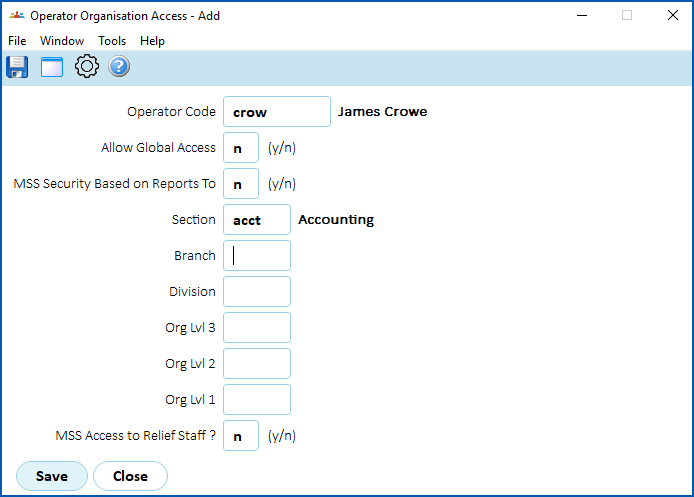
- The Operator Organisation Access detail screen displays.
- At the Allow Global Access field, enter:
- y (yes) to grant the user access to every employee. When you select y (yes), all remaining fields appear greyed out (unavailable). Go to step 6.
- n (no) to restrict the user's access to one of six available organisational levels (groups of users). Go to step 5.
- At the field for the organisational level you require, click Window to display a list of codes to choose from, find and double-click a code to add it to the field. In the following example, the user is restricted to employees in the Head Office Accounting section.
- Click Save.
© 2023 Fusion5. All rights reserved.