---
title: "Annualised employees register"
id: "annualised-employees-register"
project: "EHR User Guide"
url: "https://help.cloud5.com.au/articles/ehr-user-guide/annualised-employees-register"
updated: 2026-10-19T00:53:35Z
---
# Annualised employees register
## View annualised employees
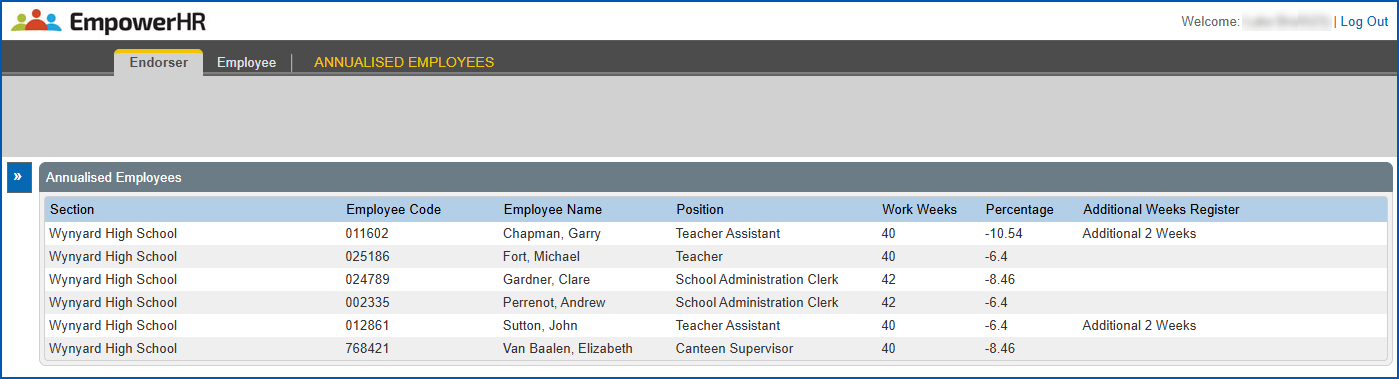
The Annualised Employees register is where you can see a list of employees who EmpowerHR identifies as annualised.
EmpowerHR checks the annualised percentage on the employee’s regular transaction against the percentages held in Annualisation Percentages Admin. Together with the payment code held in the rp15 installation setting, the system is able to identify when an employee qualifies as annualised.
For each annualised employee, the register displays the:
* Work weeks
* Percentage
* Additional weeks register associated with the employee's annualisation
To view the annualised employees register:
1. Go to **Relief and Payments** > **Annualised Employees**.
| Next topic
[Additional weeks reset](/articles/ehr-user-guide/additional-weeks-reset) |
| --- |
© 2023 Fusion5. All rights reserved.