---
title: "Additional weeks admin"
id: "additional-weeks-admin"
project: "EHR User Guide"
url: "https://help.cloud5.com.au/articles/ehr-user-guide/additional-weeks-admin"
updated: 2026-10-19T00:53:14Z
---
# Additional weeks admin
It's easy to change the default number of work weeks and the types of payment methods assigned to each additional weeks payment type.
## Update payment type work week and pay methods
To update a payment type's work week and/or payment methods: 
1. Go to **Relief and Payments** > **Additional** **Weeks Admin**.
2. At the **Additional Weeks Admin** screen, select the payment type you want to update, click **Actions**and then select **Edit** from the menu.
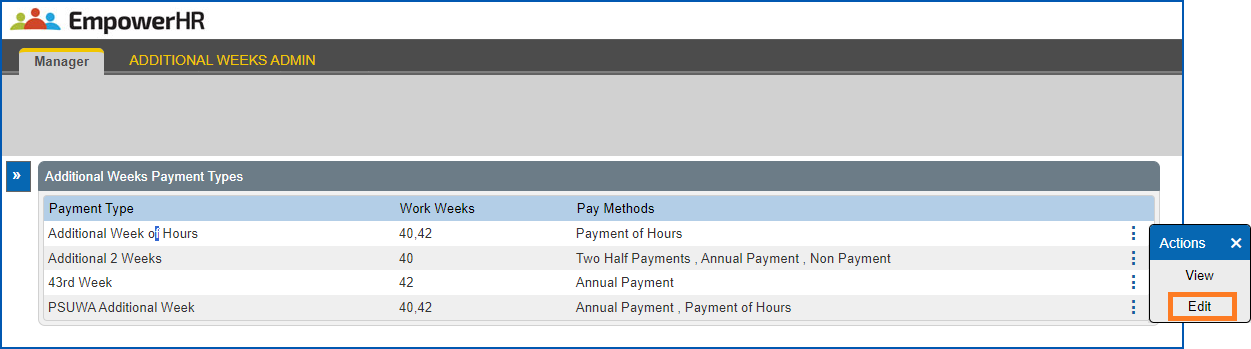
1. The **Change...** screen displays for the payment type you selected. For example:
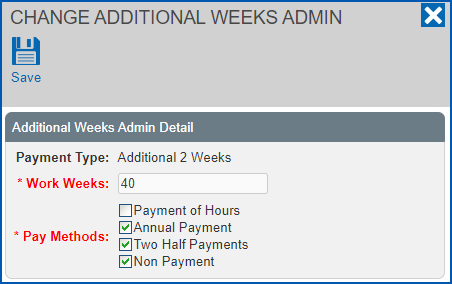
1. Make your changes to:
1. the number of **Work Weeks**, *and/or*
2. **Pay Methods**, by selecting/de-selecting the checkboxes.
2. Click **Save**.
| Next topic
[Annualised percentages admin](/articles/ehr-user-guide/annualised-percentages-admin) |
| --- |
© 2023 Fusion5. All rights reserved.