---
title: "Add position's allowances"
id: "add-position-s-allowances"
project: "EHR User Guide"
url: "https://help.cloud5.com.au/articles/ehr-user-guide/add-position-s-allowances"
updated: 2026-10-19T00:54:02Z
---
# Add position's allowances
You can attach particular allowances to a position.
To add allowances to a position:
1. At the **Create** **Positions** summary screen, select the position, and then click **Position's Allowances**.
2. EmpowerHR displays the **Position's Allowances** ****summary screen.
3. Click **New**.
4. EmpowerHR displays the **Position's** **Allowances** **- Add**details screen.
5. In **Payment Code**, click **Window**, find and double-click a code to add it to the field.
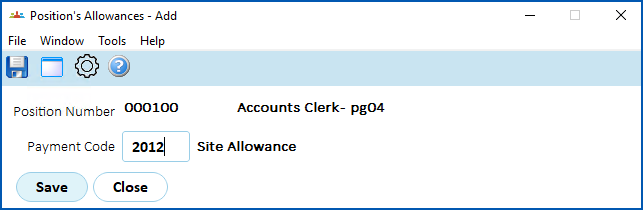
1. Click **Save**.
2. EmpowerHR displays the **Position's Allowances** summary screen, listing the allowance you added.
3. Repeat this procedure, starting at step 3, until you have added all the relevant allowances to the position.
4. When you've finished, click **Close**.
| Next topic
[Add job descriptions for organisation chart](/articles/ehr-user-guide/add-job-descriptions-for-organisation-chart) |
| --- |
© 2023 Fusion5. All rights reserved.