---
title: "Add a calendar"
id: "add-a-calendar"
project: "EHR User Guide"
url: "https://help.cloud5.com.au/articles/ehr-user-guide/add-a-calendar"
updated: 2026-10-19T00:54:18Z
---
# Add a calendar
To add a calendar and generate the settlement periods: 
1. Go to Flexi Time > Administration > Define Settlement Periods.
2. Check to see if the calendar already exists. Go to the Search Filter and at:
1. Calendar Year, enter a calendar year
2. Flexi Time Code, select a code from the dropdown list
3. Click Search. If the calendar year for the selected flexi time code:
1. exists, Period Ranges displays a list of all the settlement periods in that calendar. No further action is necessary.
2. doesn’t exist, the following message displays. Go to step 4.

1. Click **Add Calendar**.
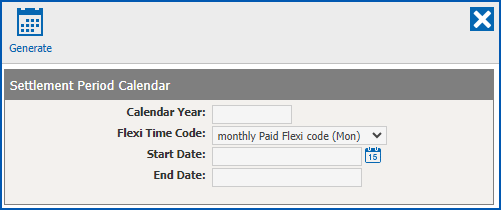
1. At **Settlement Period Calendar**, complete the fields using the following table as a guide.
| **At this field...** | **Do this...** |
| --- | --- |
| Calendar Year | Enter the year for the calendar. |
| Flexi Time Code | Nothing. The flexi time code you used in your search displays. |
| Start Date | If:
- there are no previous settlement periods, enter a start date based on your organisation's preferred day of the week for settlement periods, for example, a Friday
- there are previous settlement periods, the system automatically calculates and displays the day after the last date of the previous settlement period
|  | To maintain data integrity, it's best to leave the system-generated date as is. |
| --- | --- | |
| End Date | Nothing. The system automatically calculates and displays the end date for the calendar. |
1. Click **Generate**. The new calendar is generated and the settlement periods are displayed in the **Period Ranges** list.
|  | You can use the **Search Filter** if, at any time, you want to narrow down the **Period Ranges** list on display. |
| --- | --- |
| Next topic
[Add a settlement period](/articles/ehr-user-guide/add-a-settlement-period) |
| --- |
© 2023 Fusion5. All rights reserved.