EmpowerHR's position bulk abolish feature is particularly useful where, for example, positions are related to a job of work and need to be abolished once the job is completed. You can abolish positions within a specific section from a specific date - in bulk.
The positions you want to abolish must be vacant, substantively and temporarily, at the request date. Any occupants EmpowerHR finds are listed as not affected. Any positions already abolished are not affected but are listed as already abolished.
To abolish positions in bulk:
- Go to Tasks > Establishment > Positions > Bulk Abolish.
- At the Bulk Abolish - Add screen, at:
- Section, enter the section the positions belong to
- Redundant Date, enter the date you want to abolish the positions
- Authority, click Window, find and double-click the authority code to add it to the field. (This field is used to record who has authorised the bulk abolition. If you leave the field blank, EmpowerHR copies the authority from the last bulk abolition).
- Click Process. EmpowerHR displays the number of positions to abolish, prompting you to confirm the action.
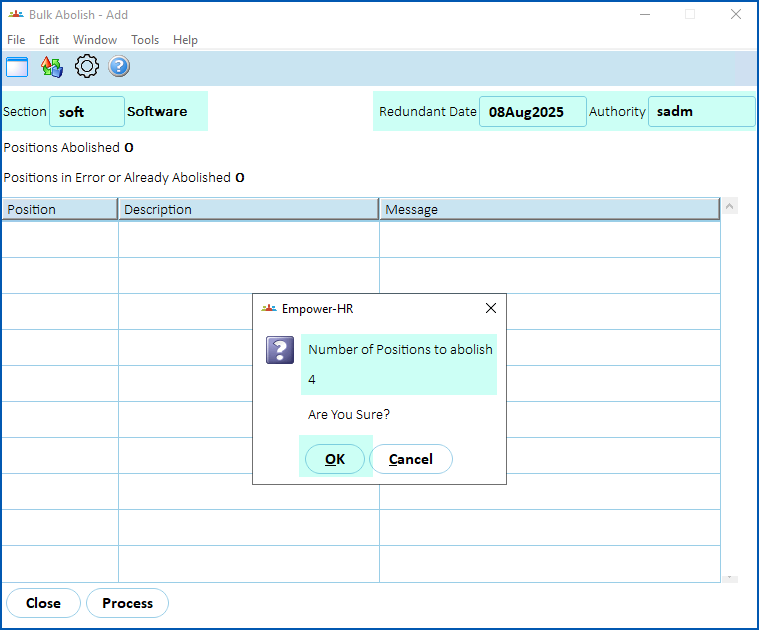
- Click OK to confirm.
- EmpowerHR:
- abolishes vacant positions that are not already abolished at the request date
- displays any occupied positions or positions already abolished, for further action
© 2023 Fusion5. All rights reserved.