---
title: "Issues resolved in EmpowerHR 2024.2"
id: "issues-resolved-in-empowerhr-2024-2"
project: "EHR Release Notes"
url: "https://help.cloud5.com.au/articles/ehr-release-notes/issues-resolved-in-empowerhr-2024-2"
updated: 2026-11-08T21:46:46Z
---
# Issues resolved in EmpowerHR 2024\.2
* [Compliance - unable to save nesa record (employee registration): ihelp 500676](/articles/ehr-release-notes/issues-resolved-in-empowerhr-2024-2/a/h4__1637287658)
* [Casual relief staff - casual sections - sorting issue: ihelp 500667](/articles/ehr-release-notes/issues-resolved-in-empowerhr-2024-2/a/h4__1710233522)
* [Staff management - all casuals display: ihelp 500895](/articles/ehr-release-notes/issues-resolved-in-empowerhr-2024-2/a/h4_869678492)
* [Servlet access security holes (pen testing): emp-3805](/articles/ehr-release-notes/issues-resolved-in-empowerhr-2024-2/a/h4__944767067)
* [Database definition attributes in config.xml - investigation and update: ihelp 490457](/articles/ehr-release-notes/issues-resolved-in-empowerhr-2024-2/a/h4_1305122175)
* [Backpay produces errors: emp-8979](/articles/ehr-release-notes/issues-resolved-in-empowerhr-2024-2/a/h4__780697267)
* [Backpay produces correct hours but incorrect amounts: ihelp 505373](/articles/ehr-release-notes/issues-resolved-in-empowerhr-2024-2/a/h4_1033733679)
* [Maunsell GL not disconnecting from database when finished: ihelp 500358](/articles/ehr-release-notes/issues-resolved-in-empowerhr-2024-2/a/h4__1851322941)
* [Tax treatment code validation not working for paid non-employees: ihelp 511240](/articles/ehr-release-notes/issues-resolved-in-empowerhr-2024-2/a/h4__869823444)
* [Leave request - pay rate field (when set to hidden is still visible): ihelp 505703](/articles/ehr-release-notes/issues-resolved-in-empowerhr-2024-2/a/h4_604462527)
* [SAFFE file error: ihelp 483330](/articles/ehr-release-notes/issues-resolved-in-empowerhr-2024-2/a/h4_1732557268)
* [STP checking report - income stream changes: ihelp 454155 #13722](/articles/ehr-release-notes/issues-resolved-in-empowerhr-2024-2/a/h4__1417712258)
* [STP checking report with terminated employees - zeroes display in two columns: ihelp 515472](/articles/ehr-release-notes/issues-resolved-in-empowerhr-2024-2/a/h4__390306004)
* [Employee passwords screen - error occurs when searching: emp-8162](/articles/ehr-release-notes/issues-resolved-in-empowerhr-2024-2/a/h4__838805861)
* [Individual formula calculation screen - showing different formula type for closed employments: ihelp 397703 #13670](/articles/ehr-release-notes/issues-resolved-in-empowerhr-2024-2/a/h4__1024028887)
* [Formula amount paid for closed employment (EOY) - not showing on view formula type screen: emp-6132](/articles/ehr-release-notes/issues-resolved-in-empowerhr-2024-2/a/h4__1721779708)
* [Formula 2 not determined/calculated for some closed average employments: ihelp 398025 #13667](/articles/ehr-release-notes/issues-resolved-in-empowerhr-2024-2/a/h4__801523376)
* [Pay certification pre-process change - sending email text message stored in text file: emp-9162](/articles/ehr-release-notes/issues-resolved-in-empowerhr-2024-2/a/h4__1211730725)
* [Null error occurs when changing dates in create leave request screen: emp-9182](/articles/ehr-release-notes/issues-resolved-in-empowerhr-2024-2/a/h4_571317657)
* [HDA allowance paid at incorrect rate: emp-9160](/articles/ehr-release-notes/issues-resolved-in-empowerhr-2024-2/a/h4__1123666348)
* [GESB SAFF program (criogess) - multiple employments issue: ihelp 355630 #13658](/articles/ehr-release-notes/issues-resolved-in-empowerhr-2024-2/a/h4__511369134)
* [Schools auto increment days count not including closed employments : ihelp 393601 #13103](/articles/ehr-release-notes/issues-resolved-in-empowerhr-2024-2/a/h4_830336463)
* * *
#### **Compliance - unable to save nesa record (employee registration): ihelp 500676**
iHelp: 500676
EMP-8822
Reported by: Catholic Education Archdiocese Canberra and Goulburn (CECG)
**Issue**
****
Located at:
**Tasks** > **Compliance Management** > **Employee Registration**
CECG is unable to save a new record created for a **NSW Education Standards Authority Education (NESA)** registration with the **Accreditation Level** set to **Proficient (alpt)**.
**Resolution**
We've fixed the program and the record can now be saved.
* * *
#### **Casual relief staff - casual sections - sorting issue: ihelp 500667**
iHelp: 500667
EMP-8824
Reported by: Catholic Education Archdiocese Canberra and Goulburn (CECG)
**Issue**
Located at:
**Tasks** > **Casual Relief** > **Casual Relief Staff** (next level) **Casual Sections**
From the **Casual Relief Staff** summary screen, when users navigate to the next level to the **Casual Sections** screen, they are unable to sort the data based on the column.
**Resolution**
We've now enabled sorting by clicking the column's title.
* * *
#### **Staff management - all casuals display: ihelp 500895**
iHelp: 500895
EMP-8831
Reported by: Catholic Education Archdiocese Canberra and Goulburn (CECG)
**Issue**
Located in self service at:
**Staff Management**
Located in desktop at:
**Tasks** > **Casual Relief** > **Casual Relief Staff** > **Casual Sections**
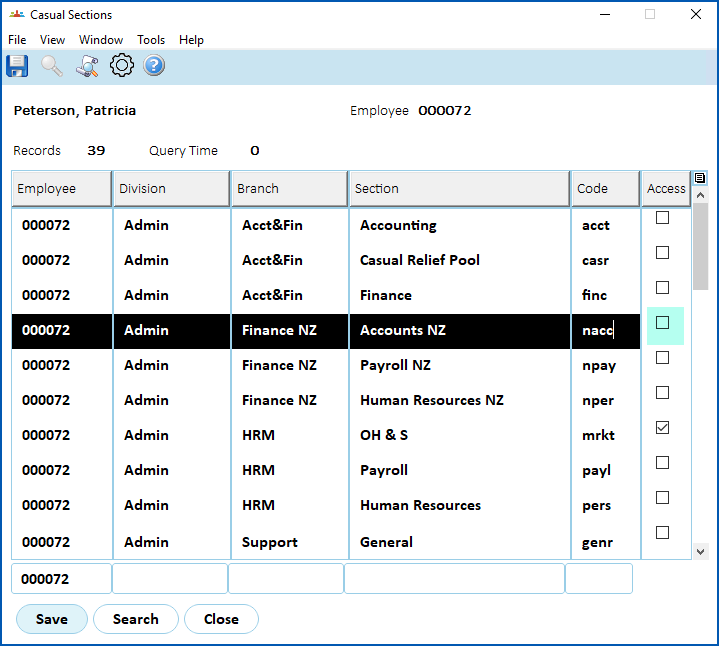
The MSS **Staff Management** screen displays casual staff even when their access to the section is removed via the desktop's **Casual Sections** screen.
[+] [Show example: casual sections](javascript:void%280%29)
[-] [Hide example: casual sections](javascript:void%280%29)
In the desktop **Casual Relief Staff** > **Casual Sections** screen for an employee, when a section's **Access** checkbox is cleared (as shown in the following example), the employee should not appear in the MSS **Staff Management** screen for the manager of that section. **Staff Management** should only show casuals who have the **Access** checkbox selected for the school/section on the **Casual Sections** screen.
**Resolution**
We've applied the fixes required to *not* display restricted employees (those de-selected in the **Casual Sections** screen) in the MSS **Staff Management** screen.
* * *
#### **Servlet access security holes (pen testing): emp-3805**
EMP-3805
Reported internally (Fusion5)
**Issue**
A self service request containing an attachment and report in its URL  did not go through the security filter which, in some instances,
URL = uniform resource locator, colloquially known as an address on the web
let users fetch files without authorisation.
**Resolution**
We've updated self service to use the security filter for URL patterns containing attachments, reports, and FOP . This ensures users are logged in when they access the material, and stops unauthorised people from fetching files.
FOP = formatting objects processor. A library self service uses to convert XML to PDF
* * *
#### **Database definition attributes in config.xml - investigation and update: ihelp 490457**
ihelp: 490457
EMP-8673
Reported by: Department for Education, Children and Young People (DECYP)
**Issue**
The mawson.db.maximum-connection-lifetime database argument is attached to an incorrect database connection pool attribute.
**Resolution**
The mawson.db.maximum-connection-lifetime database argument has now been moved to the correct attribute (maxAge).
The mawson.db.maximum-wait, mawson.db.abandon-when-percentage-full, and mawson.db.suspect-timeout database arguments have been added to help troubleshoot database connection issues.
The database connection pool configuration functionality has been simplified.
For the updated XML definitions etc, see the *EHR Self Service Administration Manual* located in the [Infusion Knowledge Base](https://infusion.fusion5.com/).
* * *
#### Backpay produces errors: emp-8979 
EMP-8979
Reported by: Fusion5
##### Issue
Backpay hours are incorrectly calculated when LWOP is booked within a pay period.
LWOP = leave without pay
##### Resolution
We've fixed the backpay program to include leave hours.
* * *
#### Backpay produces correct hours but incorrect amounts: ihelp 505373 
iHelp: 505373
EMP-8993
Reported by: Catholic Education Archdiocese of Canberra and Goulbourn (CECG)
**Issue**
Backpay hours are correctly calculated but amounts are incorrectly calculated.
**Resolution**
In fixing [EMP-8979](/articles/ehr-release-notes/empowerhr-2024-0-01-hotfix-release-notes/a/emp8979), this issue is also fixed so calculations are correct.
* * *
#### Maunsell GL not disconnecting from database when finished: ihelp 500358 
iHelp: 500358
EMP-9019
Reported by: AECOM
**Issue**
Located at:
**Background Jobs**> **Payroll Processing**> **Interfaces**> **Finance Interface (Maunsell)**
The interface fails to disconnect from database on completion.
**Resolution**
We have fixed the issue so the interface now explicitly disconnects from database on completion.
* * *
#### **Tax treatment code validation not working for paid non-employees: ihelp 511240**
iHelp: 511240
EMP-9037
Reported by: University of South Australia (UniSA)
**Issue**
Located at:
**Tasks** > **Non-Employees**> **Non Employee**
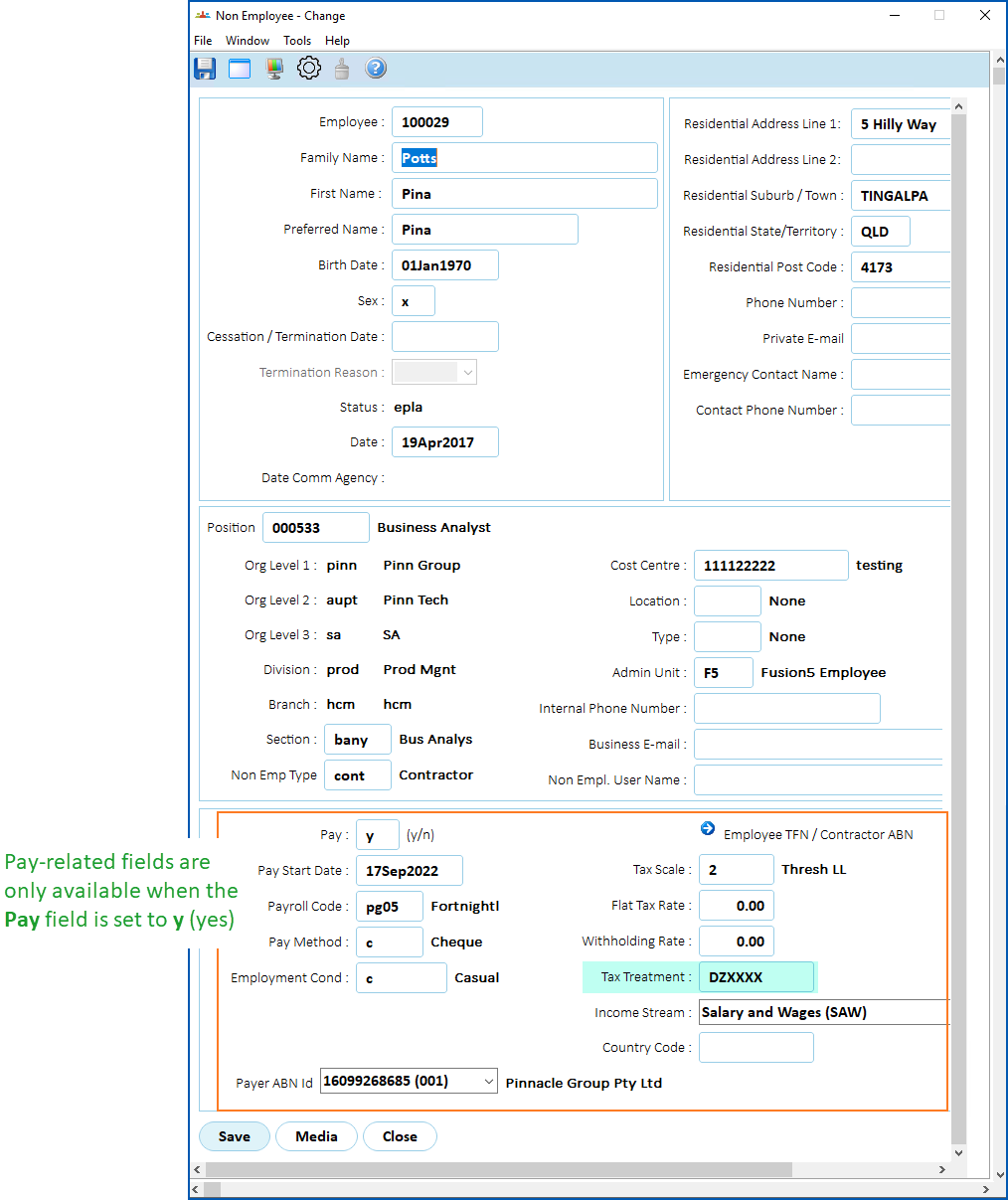
On the **Non Employee** screen, there is no validation of the **Tax Treatment** code when the field is initially blank, that is, the first time the code is entered and the screen is saved.
**Resolution**
We've fixed the issue so validation now occurs correctly.
|  | Pay-related fields (like the **Tax Treatment** field, etc) are only available when the **Pay** field is set to **y** (yes). See the following example. |
| --- | --- |
[+] [Show example: pay-related fields](javascript:void%280%29)
[-] [Hide example: pay-related fields](javascript:void%280%29)
* * *
* * *
#### Leave request - pay rate field (when set to hidden is still visible): ihelp 505703
iHelp: 505703
EMP-9063
Requested by: Department for Education, Children, and Young People (DECYP)
##### Issue
Located at:
Employee: **Requests** > **Leave**
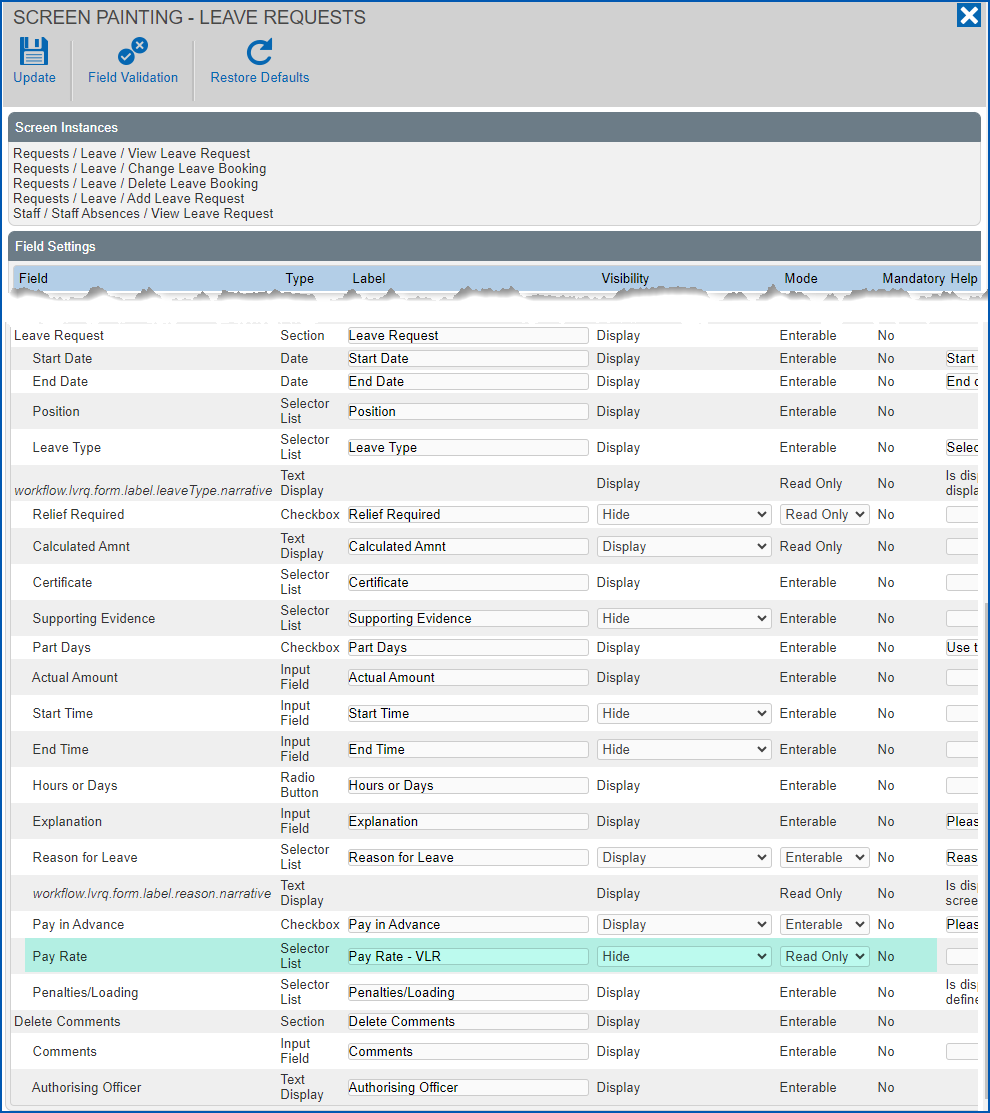
Admin: **Administration**> **Screen Management** > **Screen Painting** > **Self Service** > **Requests** > **Leave** > **Add Leave Request**
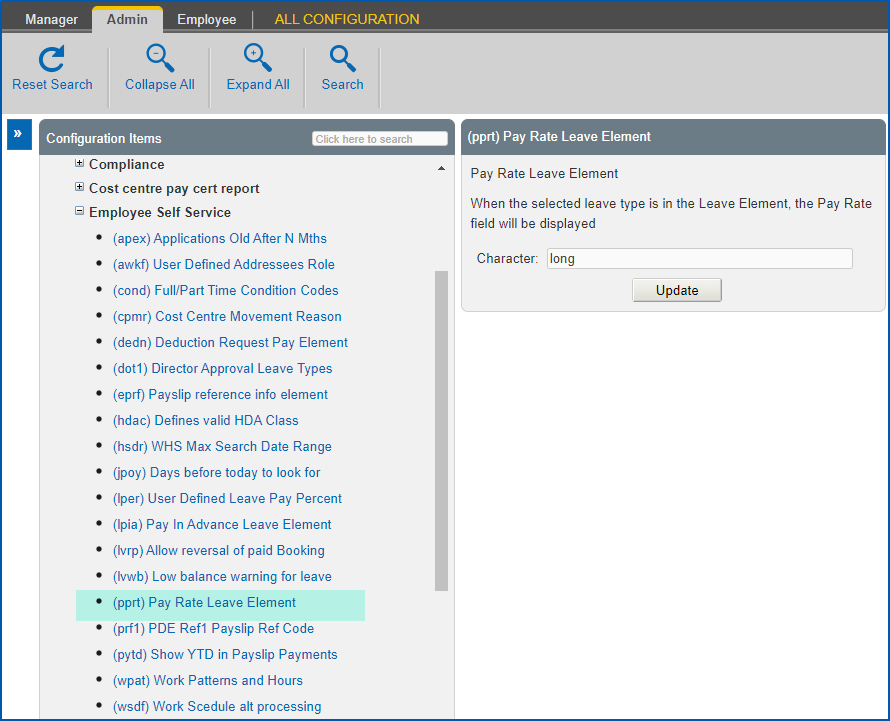
Admin: **Configuration** > **Self Service** > **Employee Self Service** > **(pprt) Pay Rate Leave Element**
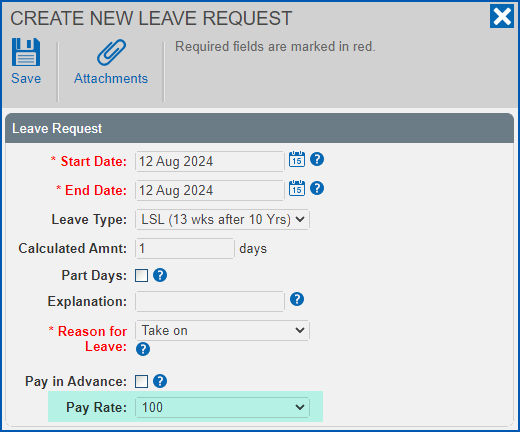
The **Pay Rate** field still displays when creating, viewing or updating a leave request, even though:
* the **Pay Rate** field is set to **Hidden** using screen painting, *and*
* the installation setting **(pprt) Pay Rate Leave Element** is left blank
[+] [Show example: leave request](javascript:void%280%29)
[-] [Hide example: leave request](javascript:void%280%29)
[+] [Show example: screen painting](javascript:void%280%29)
[-] [Hide example: screen painting](javascript:void%280%29)
[+] [Show example: pprt](javascript:void%280%29)
[-] [Hide example: pprt](javascript:void%280%29)
##### Resolution
We've fixed the issue so the following occurs.
EmpowerHR shows the **Pay Rate** if:
* the field is set to **Display** in screen painting, *and*
* the leave element is provided in the **(pprt) Pay Rate Leave Element**installation setting for the leave type you want the **Pay Rate** field to display
```
EmpowerHR shows the Pay Rate if: the field is set to Display in screen painting, andthe (pprt) Pay Rate Leave Element installation setting is blankEmpowerHR does not show the Pay Rate if:the Pay Rate field is set to Hidden in screen painting
```
* * *
#### SAFFE file error: ihelp 483330
iHelp: 483330
EMP-8541
Requested by: ARTC
##### Issue
Located at:
**Background Jobs** > **Payroll Processing** > **Interfaces** > **SAFFE Super File** (criosafe)
**Background Jobs** > **Payroll Processing** > **Interfaces** > **SAFFE Super File (TMD)** (criosaft)
**Background Jobs** > **Payroll Processing** > **Interfaces** > **SAFF Super File**(criosaff)
**Background Jobs** > **Payroll Processing** > **Interfaces** >**GESB SAFF File**(criogess)
**Background Jobs** > **Payroll Processing** > **Interfaces** >**MLC Super Interface**(criofmlc)
When you move an employee to a different payroll, running SAFFE processes can cause an error (like the following example), and stop the process from running to completion.
>>> ERROR: Employee: nnnnnnnn has no row found in the Employee Position History for the effective date.
##### Resolution
We've modified the programs to fix the issue.
* * *
#### STP checking report - income stream changes: ihelp 454155 #13722 
iHelp: 454155 #13722
EMP-8346
Reported by: Telethon
**Issue**
Located at:
**Background Jobs**> **STP**> **STP Reconciliation Reports**>**STP Checking Report - Phase 2**
Amounts for **Leave** and **Salary Sacrific** **e** are missing where an employee has multiple Income Stream entries. Super liability is also summed up, showing the total for each income stream instead of separating the amounts.
**Resolution**
Now, where an employee has multiple Income Stream entries, EmpowerHR correctly displays the amounts for **Leave** and **Salary Sacrifice**. **Super liability** also shows separate amounts instead of the total for each income stream.
* * *
#### STP checking report with terminated employees - zeroes display in two columns: ihelp 515472 
iHelp: 515472
EMP-9087
Reported by: Telethon
**Issue**
Located at:
**Background Jobs**> **STP**> **STP Reconciliation Reports**>**STP Checking Report - Phase 2**
When the client runs the **STP Checking Report** with terminated employees included, the report totals show zeros for the following columns:
* **ETP Taxable**
* **ETP PAYGW**
**Resolution**
Now, the report shows the correct sums in both columns instead of zeros.
* * *
#### Employee passwords screen - error occurs when searching: emp-8162
EMP-8162
Requested internally (Fusion5)
Located at:
**Administration**> **System Security**>**Employee Passwords**
**Issue**Users are unable to perform a search at the **Employee Passwords** screen. On clicking **Find Now**, EmpowerHR displays an error message and no search results.
**Resolution**The system code has been revised, and the search function now works.
* * *
####
#### Individual formula calculation screen - showing different formula type for closed employments: ihelp 397703 #13670
iHelp: 397703 #13670
EMP-6928
Requested by: Catholic Schools Office Diocese of Maitland-Newcastle (CSOMN)
Located at:
**Enquiries > School > Individual Formula Calculation**
**Enquiries** > **School** > **View Formula Type**
**Issue**The **Individual Formula Calculation** screen shows a Formula 1 type which is different to the formula type used in the pay calculation. The formula type used for employees with only closed employments is Formula 2.
**Resolution**The pay calculation process now updates the **View Formula Type** information where an employee has averaged employments which are closed. The **View Formula Type** and **Individual Formula Calculation** screens now show the same formula type used to calculate the formula pay at the end of the school year.
* * *
#### Formula amount paid for closed employment (EOY) - not showing on view formula type screen: emp-6132
EMP-6312
Requested internally (Fusion5)
Located at:
**Enquiries** > **School** > **View Formula Type**
**Background Jobs** > **Payroll Processing** > **Pay Calculations > Calcs Error Listing**
**Tasks** > **Payroll** > **Payroll Processing** > **View Calcs Incident Messages**
**Issue**Employees with averaged employments closed during the school year receive a formula calculation during the end of year school processing. The employee is not showing with a formula type on the **View** **Formula Type** enquiry screen.
**Resolution**All averaged employees receiving a system-generated formula payment at the end of the school year now appear on the **View Formula T** **ype** enquiry screen. The pay calculation process updates the **View Formula Type** screen when calculating any closed employments with Formula 2 payments due.
The following new warning message appears on the **Calcs Error Listing** and **View Calcs Incident Messages**screens:
* Employee flagged not to be paid, formula pay not generated
EmpowerHR displays this message where a formula type is determined but the employment record is flagged as **Pay** = **n**. In this case, no record appears on the **Individual Formula Calculation** enquiry screen.
* * *
####
#### Formula 2 not determined/calculated for some closed average employments: ihelp 398025 #13667 
iHelp: 398025 #13667
EMP-6925
Requested by: Catholic Education Diocese of Bathurst
Located at:
**Tasks**> **School**>**Formula Check**
**Issue**Some average employments that began and closed during the school year are not being identified and paid a formula payment.
**Resolution**The formula check now correctly counts the term days not worked in the school year for the employments. A formula type is now identified and a formula payment now calculates for these employments.
* * *
#### Pay certification pre-process change - sending email text message stored in text file: emp-9162
EMP-9162
Requested internally (Fusion5)
Located at:
**Pay Cert pre-process**
**Issue**After allowing for the Pay Cert pre-process to delay emailing, the program is unable to use the external file for storing the email's message text (set via the installation setting called **Pay Certification message file (ccpm)**).
**Resolution**We have modified the Pay Cert Pre-process program to store the external path and file name (instead of the content of the file) when an external file is used.
|  | No symbolic **$paidDate** can be used in the content of the file.. |
| --- | --- |
* * *
#### Null error occurs when changing dates in create leave request screen: emp-9182
EMP-9182
Requested by: Department of Communities (DoC)
Located at:
**Requests** > **Leave** > **New Request**
**Issue**In an earlier change to EmpowerHR, we improved readability of Self Service constant, the **please select** option (**Leave Type** field). A few places in the **Create New Leave Request** screen still refer to the old constant value, causing an error.
**Resolution**We changed any condition checks that still referred to the old constant value to use the new value so the reported error no longer occurs.
* * *
#### HDA allowance paid at incorrect rate: emp-9160
EMP-9160
Requested by: Department of Communities (DoC)
Located at:
**Tasks > Employees > Position Movement > Conditions Change**
**Tasks** > **Employees** > **Temporary Movements** > **Higher Class Duties**
**Issue**A recent fix to the **Hours per Period** column on the **Conditions Change** screen to show the correct part-time hours (EMP-9110) causes the HDA allowance to be paid at an incorrect rate. This is because the **Temp Posn Annual Salary** now uses the **Hours per Period** as a reference and increases the salary which is already at a Full Time Equivalent.
**Resolution**We have removed the changes applied for EMP-9110 so the HDA allowance is again paid at the correct rate. (Note: Issue EMP-9110 still exists).
* * *
#### GESB SAFF program (criogess) - multiple employments issue: ihelp 355630 #13658 
iHelp: 355630 #13658
EMP-8205
Requested by: VenuesWest
Located at:
**Background Jobs** > **Payroll Processing** > **Interfaces** > **GESB SAFF File** ****
**Issue**
Where an employee has multiple employments, EmpowerHR is identifying the wrong employee condition code.
**Resolution**We have changed the logic so the program now works correctly by picking up the correct condition code.
* * *
#### Schools auto increment days count not including closed employments: ihelp 393601 #13103
iHelp: 393601 #13103
EMP-6742
Requested by: Catholic Education Diocese of Bathurst (CEDB)
Located at:
**Tasks** > **Employees** > **Position Movement** > **Salary Change**
**Issue**
EmpowerHR's schools functionality (teacher auto increments) is not counting the days for closed employments in the increment period.
**Resolution**EmpowerHR now works correctly by including closed employments.
| Next topic
[EmpowerHR 2024.1.04 hotfix release notes](/articles/ehr-release-notes/empowerhr-2024-1-04-hotfix-release-notes) |
| --- |
© 2023 Fusion5. All rights reserved.